
Find your way around the app
Find your way around: the sidebar and phone bottom bar, your agent's chat bubble, the account menu and links your brokerage adds.
The menu on the left (Menu on a phone) takes you to every page, starting with your Dashboard. Your agent is one click away: their name sits in the top right corner, and their chat bubble floats in the bottom corner.
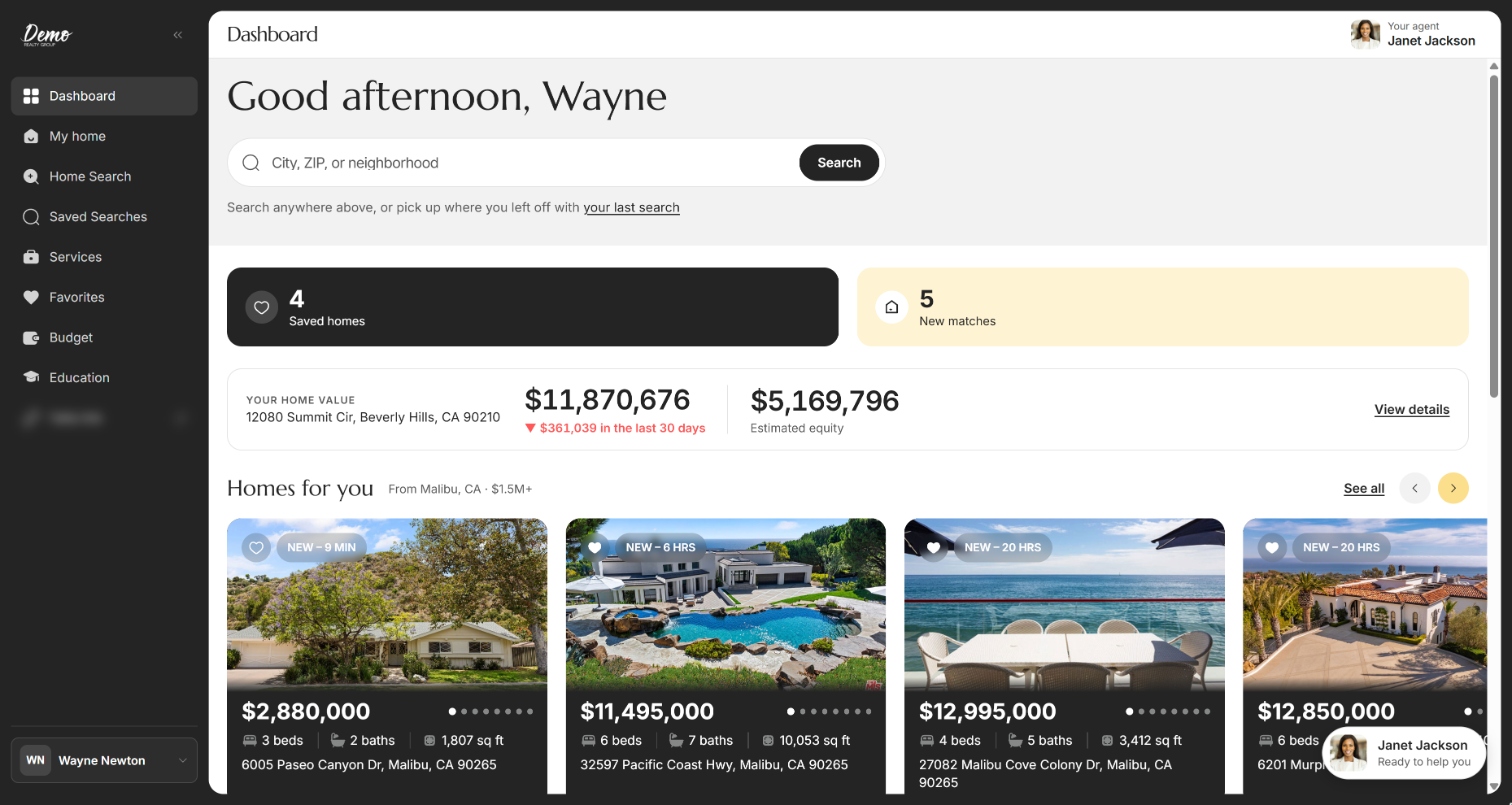
The sidebar
The sidebar lists the pages in the order below. Your brokerage decides some of them, so yours may be a little shorter or longer.
| Control | What it does | Learn more |
|---|---|---|
| Brokerage logo | Takes you back to your dashboard. | |
| Arrow beside the logo (Collapse navigation) | Shrinks the sidebar to a row of icons and hides the logo. Point at an icon to see its name. To open it again, click the » arrow (Expand navigation) at the top. Computers only. | |
| Dashboard | Your home page: a search box, your saved homes, new matches, homes picked for you, local pros, guides and mortgage rates. | Your dashboard |
| Home Search | Search homes for sale in a grid or on a map. | Search for homes |
| Saved Searches | The searches you or your agent saved, and how often you hear about new matches. | Save a search and get alerts |
| Services | Local pros your brokerage recommends, like lenders and inspectors. | Find local pros on Services |
| Favorites | The homes you saved with the heart. | Favorite homes |
| Budget | Calculators for what you can afford and how your equity grows. If you don't see Budget, your brokerage doesn't offer it. | Estimate what you can afford |
| Education | Short guides for each stage of buying a home. | Learn about home buying |
| Brokerage links | Extra links your brokerage adds below Education, with their own names. Outside websites show a small arrow and open inside the app. If the page is blank or shows an error, click Open in new tab. Email and phone links open your email or phone app. | Links from your brokerage |
| Your name | Opens your account menu. See the next table. |
Looking for rentals? In Home Search, set Home type (or Property Type under More filters) to Rental. Some apps have a separate Rental Search page in the menu instead of Favorites (Search for rentals). Don't see either? Ask your agent.
Your account menu
Click your name at the bottom of the sidebar. The menu opens upward. Press Esc or click outside it to close it.
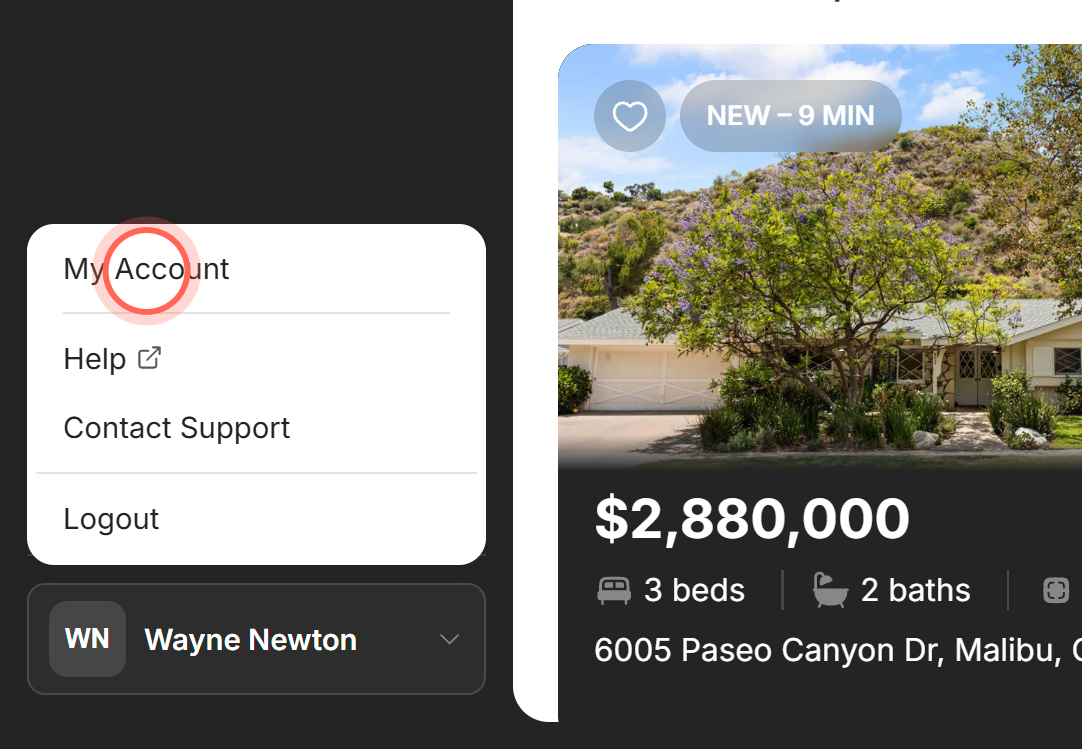
| Control | What it does | Learn more |
|---|---|---|
| My Account | Opens Settings, where you change your name, email, phone number and password. | Update your contact information |
| Help | Opens our help center in a new tab. | |
| Contact Support | Starts an email to helpme@ruuster.com in your email app. | |
| Logout | Signs you out and opens the sign-in page. In your agent's app, that phone also stops getting notifications until you sign in again. | Sign in and reset your password |
Your agent, on every page
| Control | What it does | Learn more |
|---|---|---|
| Your agent (top right) | Your agent's photo and name. Click it to see their profile card with their phone, email, bio and Share the app. | Your agent's profile |
| Chat bubble (bottom corner) | Your agent's photo, name and "Ready to help you". Click it to open your conversation. A number on it counts unread messages. On a phone it shrinks to a small circle with their photo. | Chat with your agent |
The chat bubble shows up once you've finished signing up. It hides while you're on the chat page itself.
On a phone
| Control | What it does | Learn more |
|---|---|---|
| Header | Shows your brokerage's logo on the left and Your agent on the right. | |
| Menu (bottom bar) | Opens the full sidebar as a drawer, with your name and account menu at its bottom. | |
| Search (bottom bar) | Opens Home Search. | |
| Favorites (bottom bar) | Opens the homes you saved. It stays here even when your sidebar shows Rental Search. | |
| Services (bottom bar) | Opens Services. | |
| Get the app banner | In a phone browser, offers your agent's own app if your brokerage has one. | Get the app and turn on notifications |
The bottom bar shows Menu, Search, Favorites and Services, plus any other pages your brokerage turns on. Dashboard is inside Menu.
Good to know
- Collapsed stays collapsed. The sidebar remembers whether you collapsed it, in this browser only.
- License line. Your brokerage's license details can show at the very bottom of each page. Nothing for you to do there.
- Support page. On the Support page, Email support starts an email to helpme@ruuster.com. Under Other ways to reach us are the help center with live chat and our Sales team. It has no menu, so use your browser's Back button to leave it.
FAQ
How do I message my agent?
Click the chat bubble with your agent's photo in the bottom corner of any page. Your conversation opens.
Where are my account settings?
Click your name at the bottom of the sidebar, then My Account. On a phone, tap Menu first.
How do I log out?
Click your name at the bottom of the sidebar, then Logout. On a phone, tap Menu, then your name.
Why is my menu different from what I see here?
Your brokerage chooses some pages, like Rental Search and Budget, and can add its own links. A missing page is turned off for your app, not broken.
Can I use the app in Spanish?
Not today. The app shows in English and has no language setting. Many phone and computer browsers can translate a page for you.
How do I get back to the start?
Click Dashboard at the top of the sidebar, or click your brokerage's logo.
Still need help? Reach out to us at helpme@ruuster.com and we'd be happy to assist!