
Sign in and reset your password
Sign in with your email and password (your phone number if you never set one), reset a forgotten password, and get a new reset link.
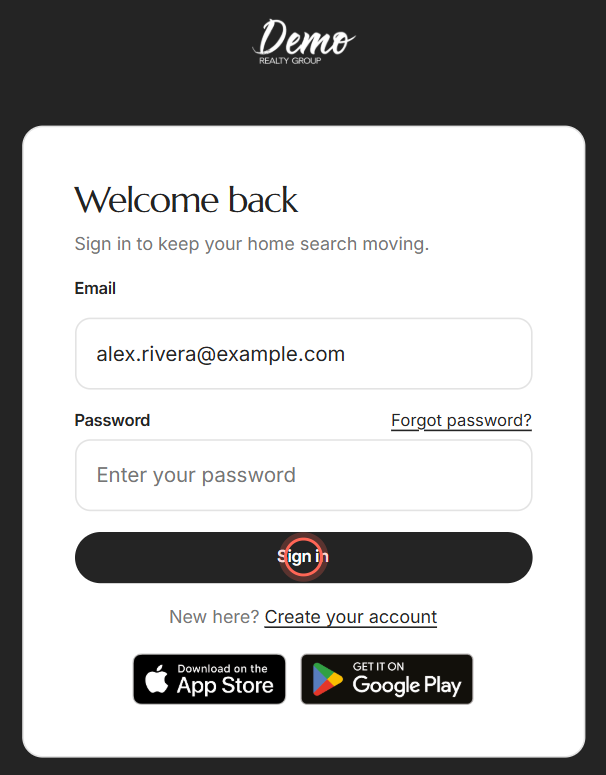
Open your agent's sign-in page, enter your Email and Password, and click Sign in. Never set a password? Use the phone number you signed up with, digits only. Forgot it? Click Forgot password? and we'll email you a link to choose a new one.
Before you start
- Sign in at your agent's app address or in their app, the one your invitation came from. Your account belongs to that brokerage only. Its sign-in page shows your brokerage's logo, or its name, above the form.
- If you never chose a password, it's your phone number with no spaces, dashes or country code, like 5555551234.
Sign in
- Open your agent's sign-in page.
- Enter your Email.
- Enter your Password.
- Click Sign in.
- If your agent's app asks for a code, type the 6-digit code from your text messages.
- Click Verify.
Your dashboard opens. If you opened a home or link before signing in, you land there instead. For more on codes, see Verify your account.
Reset a forgotten password
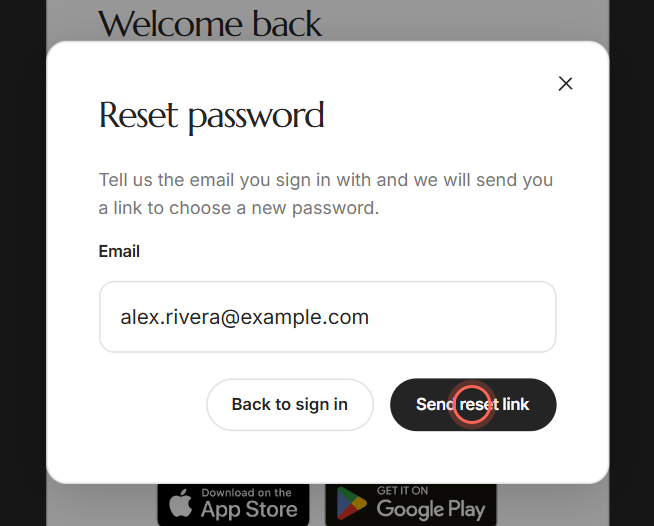
- On the sign-in page, click Forgot password?
- Enter your Email.
- Click Send reset link.
- Open the Reset Your Password email and click Reset password.
- Type a new password in New password.
- Type it again in Confirm new password.
- Click Reset password.
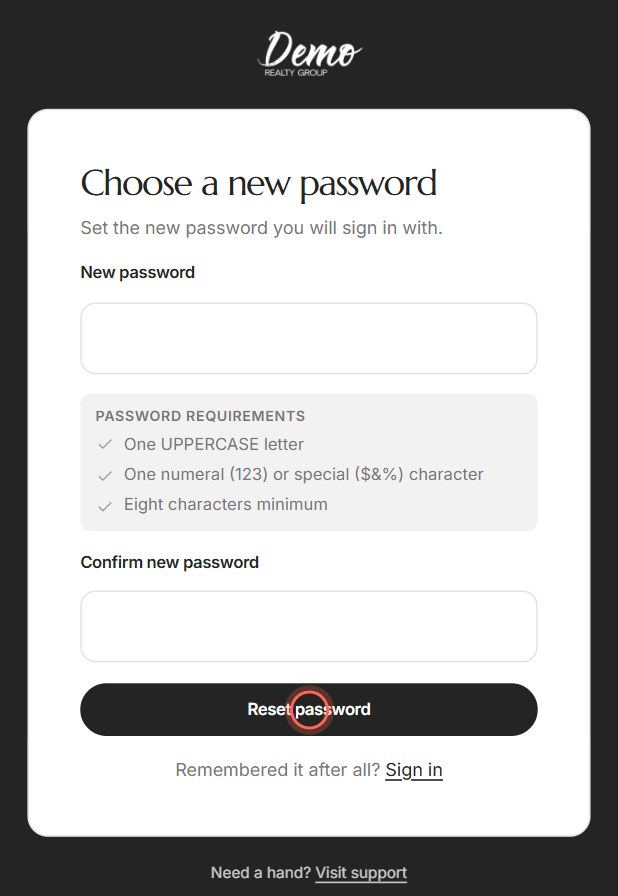
You see "Your password has been reset". Click Sign in and use your new password. It needs at least eight characters, one uppercase letter, and one number or special character like $, & or %.
Fix common sign-in problems
| What you see | What to do |
|---|---|
| "That email and password do not match our records" | Check you're on your agent's app address. If you never set a password, type your phone number as digits only. Or click reset your password in the message. |
| "User with such email was not found" | Use the email you signed up with, on your agent's app address. |
| "Too many password change requests" | You asked for many links in an hour. Wait the minutes shown, then try again. |
| "Check your email" but nothing arrives | Look in spam. If you asked more than once, use the newest email. |
| "This reset link no longer works" | Reset links work once and expire after a while. An old link still opens the form, so this shows after you click Reset password. Click Request a new link. |
| "Passwords do not match" | Type the same password in both fields. |
| "Confirm your new password" | You left Confirm new password empty. Type your new password again there. |
| "We could not reach the server to sign you in" | Check your connection, then click Try again. Your details are still there. |
Good to know
- Remembered it after all? Click Back to sign in in the Reset password window, or Sign in beside "Remembered it after all?" on the new-password page.
- Old password stops working. After a reset, only the new password works. You also get an email confirming the change.
- Need a hand? Visit support at the bottom of the sign-in screens opens our Support page. Click Email support there to write to us.
- The app keeps you signed in. Your agent's phone app keeps you signed in until you log out. In a web browser, you sign in again from time to time.
- App badges. In a web browser, if your agent has an app, the sign-in page shows App Store and Google Play badges. See Get the app and turn on notifications.
FAQ
I never made a password. What do I type?
Your phone number, digits only, with no spaces, dashes or country code. For example, 5555551234.
Can I sign in with my phone number instead of my email?
No. Your email is how you sign in. Your phone number may be your password, and it's where any sign-in code goes.
Why does the app keep logging me out?
In a web browser, sign-ins end after a while, and clearing your browsing data or using a private window signs you out too. Your agent's phone app keeps you signed in until you tap Logout.
My reset link says it no longer works. What now?
An old link still shows the new-password form, so you find out only after you click Reset password. Click Request a new link, and the Reset password window opens so you can send a fresh one.
How do I change my password once I'm signed in?
Open My Account from the menu and set a new password there. See Change your password or phone number.
I'm not getting the reset email or my code. See I'm not getting emails or my sign-in code.
Still need help? Reach out to us at helpme@ruuster.com and we'd be happy to assist!