
Estimate what you can afford
Using Ruuster 1.0? Read the 1.0 version of this article.
See a home's monthly cost, the cash you need up front and the equity it could build with Budget, using a favorited home or a sample.
Open Budget in the sidebar. Affordability shows a home's monthly cost and the cash you need up front, and Equity shows how much of it you could own over time. Pick a favorited home at the top to use its real price and taxes.
Before you start
- If you don't see Budget in your menu, your brokerage doesn't offer it.
- Budget works with homes you favorite. With no favorites yet, it uses a sample home.
- Have your yearly household income and your monthly debt payments handy.
Choose the home to budget for
- In the sidebar, click Budget. On a phone, tap Menu first.
- Click the home picker at the top left. It reads Starting Budget until you pick a home.
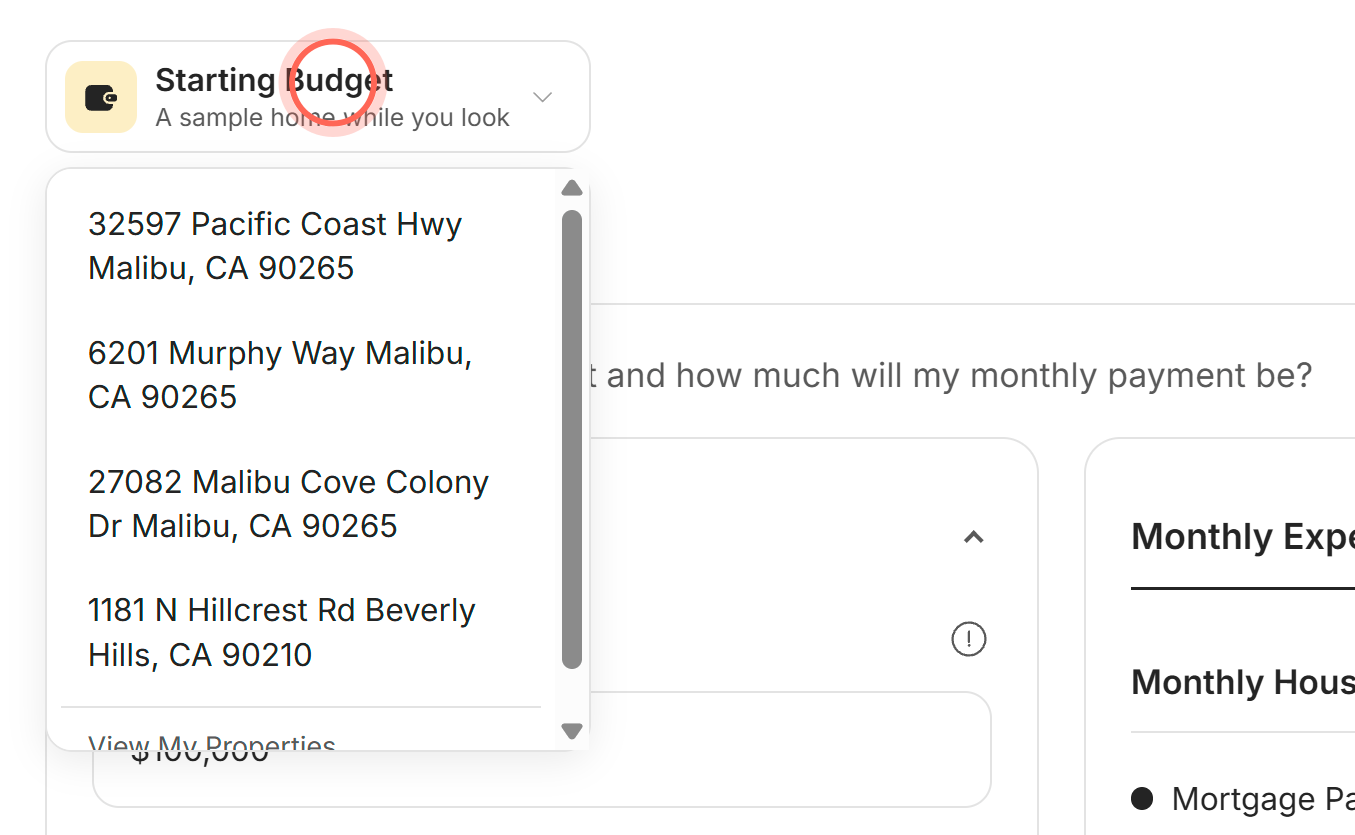
- Click one of your favorited homes.
The picker shows the home's address with "Favorited home" under it. The numbers switch to that home's price, and to last year's property taxes when they're available.
The list shows only the homes you can switch to. Once you've picked a home, Starting Budget appears in it, so you can go back to the sample. View My Properties at the bottom opens your Favorites. With several favorites, scroll the list to reach it.
With no favorites, a note says "These numbers use our sample home." Click Find homes in the note to start a search.
See what you can afford
- On Budget, click the Affordability tab.
- Under Financial Details, enter your Annual Household Income and Monthly Recurring Debt Expenses.
- Pick your Credit Score Range, or Not sure.
- Under Home Details, check Purchase Price, Downpayment (%), Mortgage Type and Mortgage Rate (%).
- Click Other Monthly Expenses or One-Time Expenses to open them and adjust any estimate.
- On the right, click Monthly Expenses or Up-Front Cash Expenses.
The results update about a second after you stop typing. Monthly Expenses shows your monthly housing costs and your Debt To Income Ratio (DTI), the share of your income that goes to debt payments. Lenders typically prefer a DTI below 36%.
Up-Front Cash Expenses adds up your down payment, closing costs (the fees paid when the sale becomes final), remodeling and furnishing, and moving.
What the Affordability fields mean
| Block | Fields | Good to know |
|---|---|---|
| Financial Details | Annual Household Income, Monthly Recurring Debt Expenses, Credit Score Range | Income is before taxes and includes tips and bonuses. Debts are your minimum monthly payments, like car loans, student loans, credit cards and child care. |
| Home Details | Zip of the property, Purchase Price, Downpayment (%), Mortgage Type, Mortgage Rate (%), Annual Property Taxes, Remodeling and Furnishing Budget | Mortgage Type is 30-Year Fixed or 15-Year Fixed. Taxes are last year's actual taxes for a favorited home when available, otherwise an estimate for the ZIP. On Starting Budget, taxes stay at $0 until you change the price or ZIP. See Rates next to the rate, when shown, opens lenders on Services. |
| Other Monthly Expenses | HOA, Utilities, Homeowner’s Insurance, PMI, Maintenance | HOA is a homeowners association fee. PMI (private mortgage insurance) is added when you put down less than 20%. Insurance is estimated at about 0.5% of the price a year, and maintenance at 1%. |
| One-Time Expenses | Points, Moving, Appraisal Fee, Credit Report, Flood Certification, Home Inspection Fee, Attorney, Prepaid Interest, Loan Origination Fee, Points, Escrow Funding - Property Taxes, Escrow Funding - Homeowner’s Insurance, Title Insurance and Search Fee | Everything here except Moving makes up your closing costs. Points shows up twice: the first is how many points you buy, and the second is what they cost in dollars. One point is 1% of the loan and usually lowers your rate by about 0.25%. Escrow is money set aside for taxes and insurance, typically two months of each. Attorney is prefilled from your state's usual practice, so check it with your agent. |
See how much equity a home could build
Equity is the part of the home you own outright: its value minus what you still owe on the loan.
- On Budget, click the Equity tab.
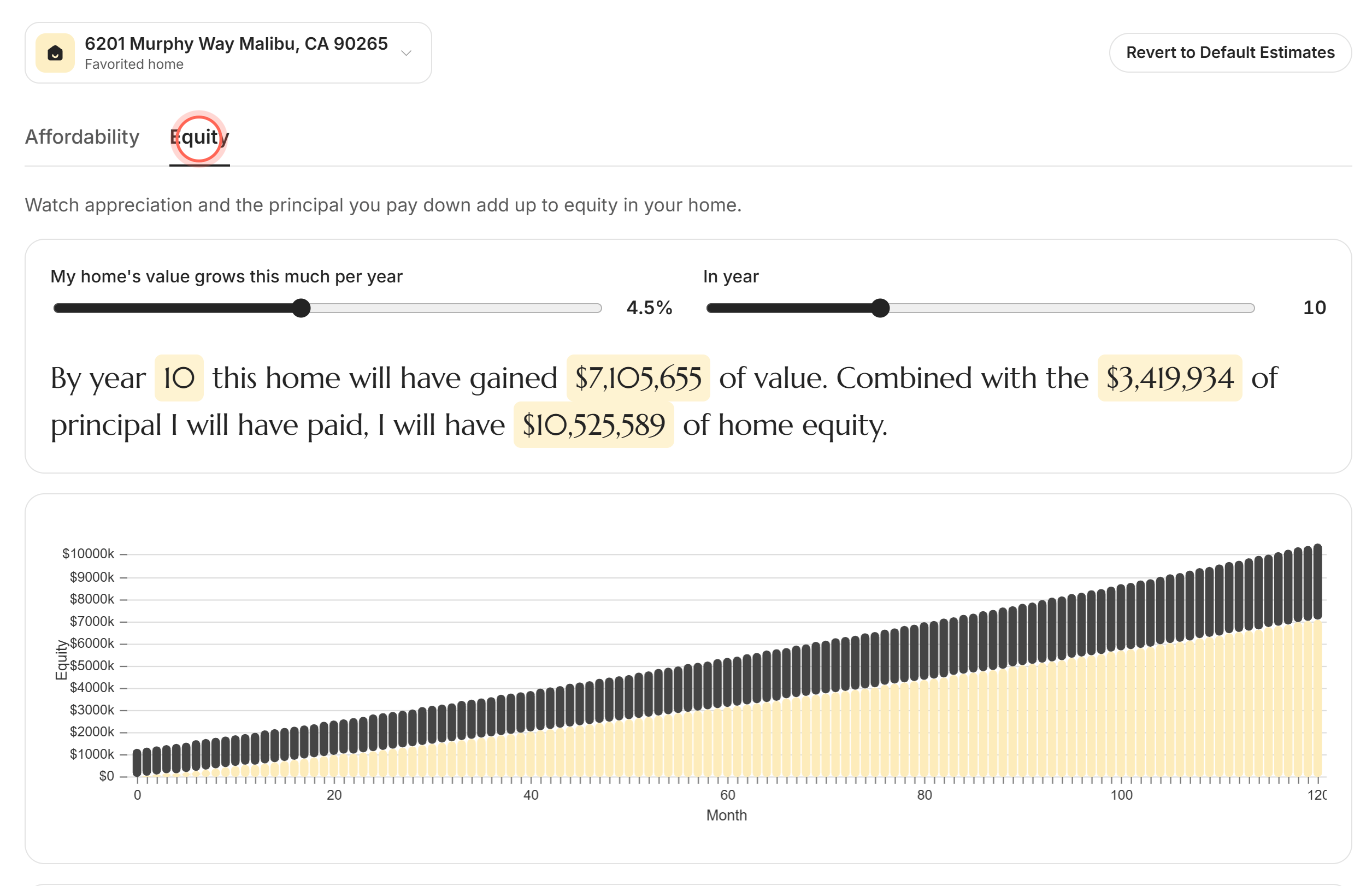
- Drag My home's value grows this much per year to the growth you expect, from 0% to 10%.
- Drag In year to the year you want to see, from 1 to 30.
- Click See detailed information under the chart.
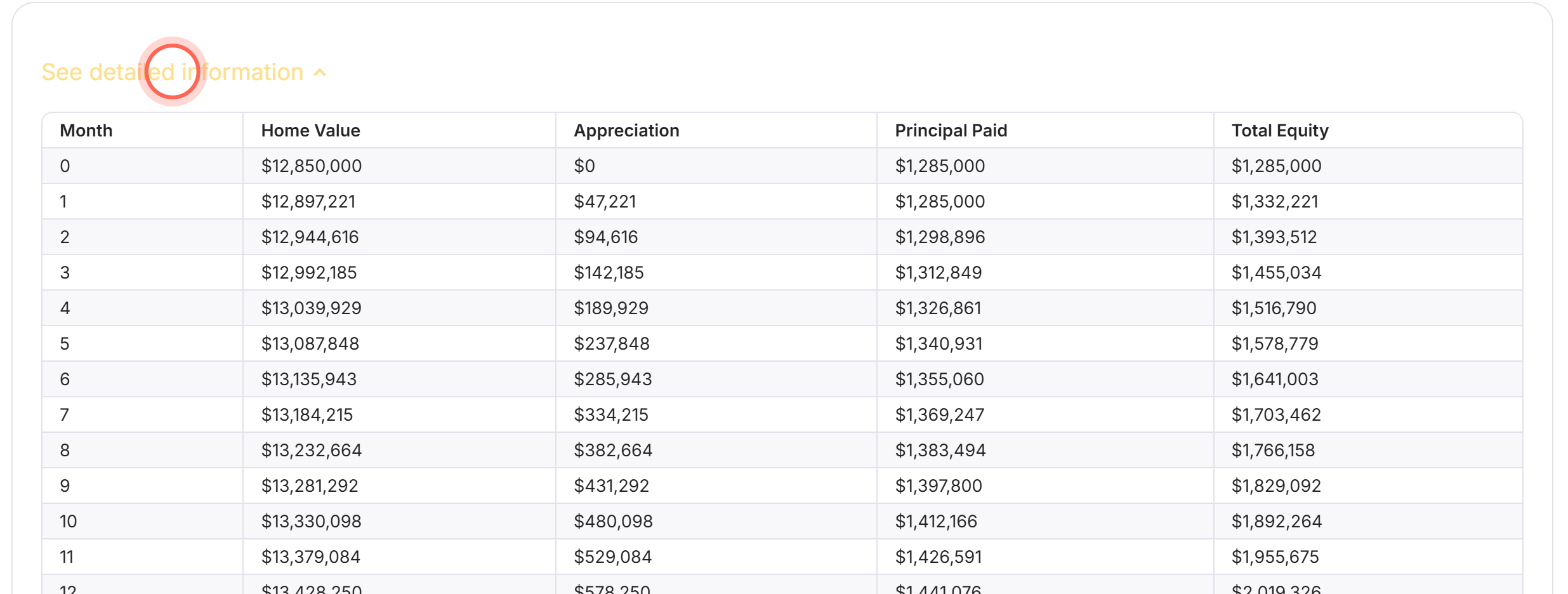
The sentence above the chart updates, for example "By year 10 this home will have gained..." It adds the home's growth in value to the principal you'll have paid, which includes your down payment. The table lists Month, Home Value, Appreciation, Principal Paid and Total Equity. Principal Paid starts at your down payment in month 0, then grows with each loan payment.
Start over with default estimates
- At the top right of Budget, click Revert to Default Estimates.
The cost estimates go back to the defaults for the home in the picker. Your income, monthly debts and credit score range stay as you entered them. If you leave without changing anything afterwards, your saved numbers come back on your next visit.
Good to know
- Saved to your account. Your numbers save about a second after you stop typing. They apply to every home you pick, while the price, ZIP, taxes and the estimates based on them follow each home.
- Equity starts fresh. The Equity sliders open at 4.5% and year 10 each time.
- Prefilled for you. Your credit score range and ZIP can come from the questions you answered when you joined.
- Estimates only. The page comes courtesy of your agent, not the MLS (the listings database agents share). It's for planning, not a loan offer.
- If the page doesn't load. You see "We couldn't load your budget." Your saved numbers are safe. Click Try again.
FAQ
Why does the budget calculator show strange numbers?
Check which home the picker shows first. Starting Budget doesn't estimate taxes, utilities or attorney fees on its own, so Annual Property Taxes, Utilities and Attorney can show $0. Change Purchase Price or Zip of the property to estimate them, or pick a favorited home. A ZIP the calculator doesn't know shows "Zip code not found."
Why don't I see Budget in my menu?
Your brokerage doesn't offer it. Budget is available for US brokerages only, and not every brokerage includes it.
Can I budget for a home I haven't favorited?
Favorite it first: click the heart on the home in Home Search, then pick it in the Budget home picker. Rentals you favorite don't appear in the picker.
Is this a mortgage pre-approval?
No. These are estimates from the numbers you enter. A lender gives you real rates and a pre-approval (a lender's written estimate of what they'd lend you).
How do I get my old numbers back after reverting?
Leave Budget without changing anything, then open it again. Your last saved numbers return.
Still need help? Reach out to us at helpme@ruuster.com and we'd be happy to assist!