
What is AI Nurture?
Using Ruuster 1.0? Read the 1.0 version of this article.
AI Nurture sends leads property alerts that adapt to what each lead looks at, through AI searches tied to a CRM tag. It needs a connected CRM.
AI Nurture emails your leads homes for sale that adapt to what each lead looks at. You set it up as an AI search on Templates, with a CRM tag. Every lead who carries that tag in your CRM gets the alerts.
Before you start
- Your brokerage needs a connected CRM, and your Ruuster account must be linked to your user in that CRM.
- Each lead needs a record in your CRM. Leads don't need a Ruuster account.
How it works
- You create an AI search. It has a name, a CRM tag and fallback criteria (an area and any filters). See Create an AI search.
- Leads join by carrying the tag. Add the tag in your CRM, or apply the search from All Clients or a lead's page. See Put leads on AI Nurture.
- It starts within 24 hours. The search shows in the lead's Searches section as Pending, then turns Active once its criteria arrive overnight.
- Ruuster sends homes that fit the lead. Alerts follow the homes the lead has been browsing. With no recent activity, they use your fallback criteria. See How does AI Nurture choose which homes to send?
- Each lead gets their own schedule. You don't pick a frequency. It adjusts automatically for each lead, and alerts go by email only.
- It runs until something stops it. Removing the tag, an unsubscribe, a stop tag or deleting the search ends or pauses it. See Stop or pause AI Nurture for a lead.
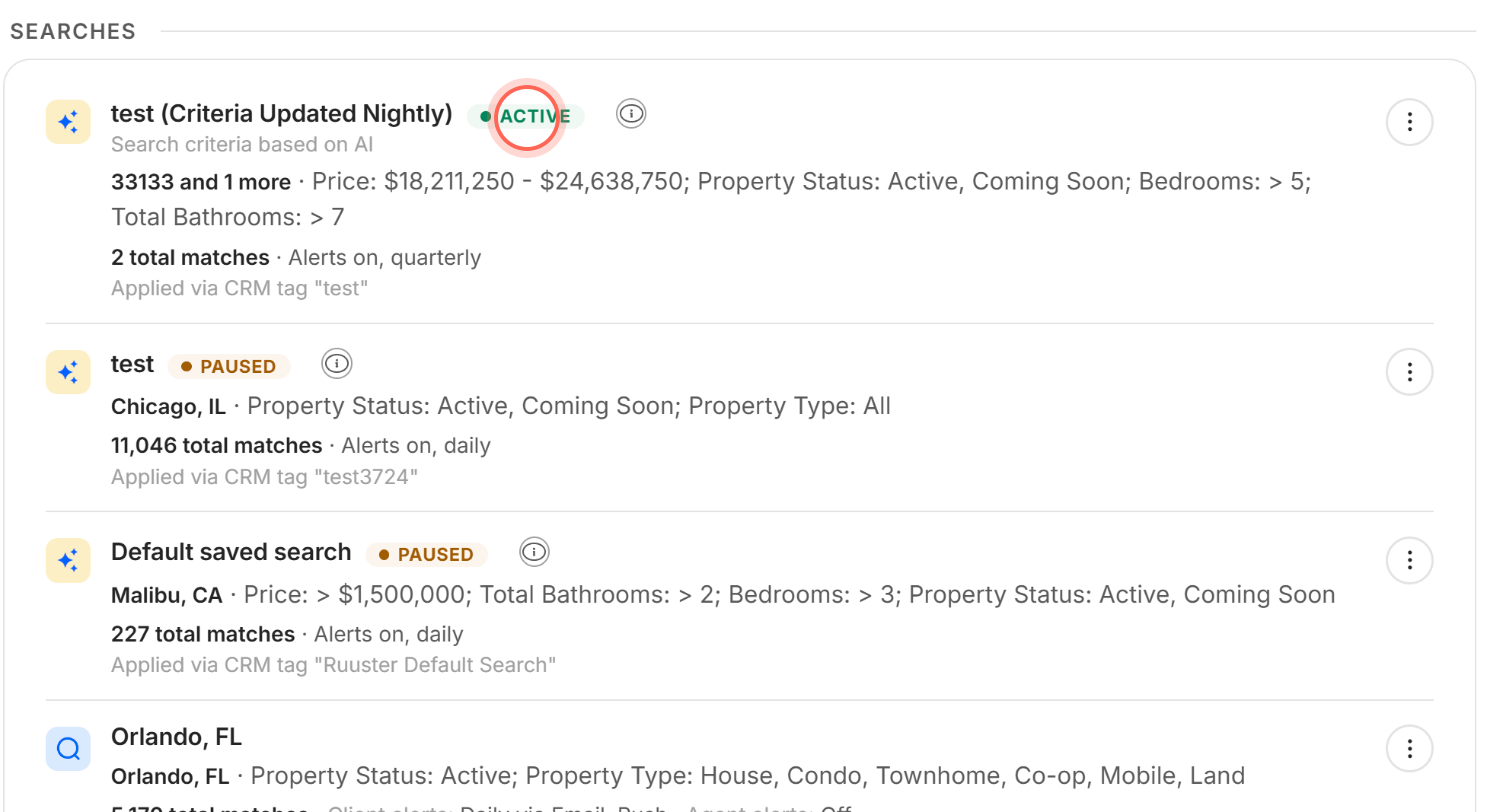
On the lead's page, the AI search's row says whether its criteria come from the lead's browsing or from your fallback criteria. The info icon beside it reminds you that alerts adapt and may not match the criteria listed.
What the statuses mean
Click the status on the AI search's row to read its explanation. Under the AI searches, a note reminds you that a tag applied today shows its criteria within 24 hours.
| Status | What it means |
|---|---|
| Pending | The search is being applied. Its criteria update overnight. |
| Active | Alerts are going to the lead. Only one AI search can be Active for a lead at a time. |
| Paused | No alerts go out. A stop tag, an unsubscribe or another active AI search is holding it back. |
How it differs from custom searches and templates
| AI search | Custom search | Template | |
|---|---|---|---|
| Who gets it | Every lead carrying its CRM tag | One client | Nobody until you apply it |
| Criteria | Adapt to each lead, with yours as the fallback | Exactly what you set | A starting point you adjust for each client |
| How often | Set automatically for each lead | You choose | You choose when you apply it |
| How it's sent | Email only | You choose | You choose when you apply it |
When to use it
Use AI Nurture for leads you don't know well yet: new, cold or quiet leads. The New template window describes it as "For people you don't know".
For clients you work with closely, use a custom search with the exact criteria they asked for.
What your lead receives
Your lead gets an email from your brokerage's team address, and replies go to you. It shows up to four homes, a See latest search results button and an unsubscribe link. The email doesn't say it's AI, and the search doesn't appear in the lead's own saved searches. See What's in a property alert email.
Good to know
- No copy for you. AI Nurture alerts go to the lead only. You can't add yourself as a recipient.
- One AI search sends at a time. A lead can carry several AI search tags, but only one is Active. The others show Paused.
- Homes for sale only. AI searches don't send rentals.
- Signing up doesn't stop it. If a lead creates a Ruuster account later, AI Nurture keeps going.
- There's a Default AI search. Its tag is
Ruuster Default Search. See What is the Ruuster Default Search?
FAQ
How often does AI Nurture email my leads?
It depends on the lead. Ruuster sets each lead's frequency automatically, so there's nothing to choose. The AI search's row on the lead's page shows their current frequency next to Alerts on.
Do AI Nurture emails ever stop on their own?
No. They stop when the tag comes off, the lead unsubscribes, their email bounces, you add a stop tag or the AI search is deleted.
Do my leads have to sign up to get the emails?
No. Leads who haven't created an account get them too, as long as they have a record in your CRM.
Can I get a copy of my leads' AI Nurture emails?
No. To see what a lead was sent, open their page and check Sent emails.
I don't see AI Search or the On AI Nurture card. Why?
Your Ruuster account isn't linked to your CRM yet, so AI Nurture stays hidden. Email helpme@ruuster.com and we'll help you get connected.
Can one lead be on two AI searches, say for two different areas?
They can carry both tags, but only one sends at a time. Put both areas in one AI search's fallback criteria, or use a custom search for the second area.
Still need help? Reach out to us at helpme@ruuster.com and we'd be happy to assist!