
How does AI Nurture choose which homes to send?
AI Nurture adapts each lead's alerts to the homes they browse, and uses your fallback criteria when they go quiet. It only sends homes for sale.
AI Nurture picks homes for each lead from the homes that lead has been looking at. When the lead hasn't browsed lately, it uses the fallback criteria you set on the AI search. Either way, it only sends homes for sale.
How it works
- It learns from browsing. It follows the homes your lead views on your Ruuster home search.
- Each lead gets their own criteria. Ruuster refreshes them every night, so they shift as the lead's interests change.
- Your criteria are the fallback. When a lead has no recent activity, alerts use the area and filters you set on the AI search.
- Each email holds up to four homes. It also has a See latest search results button for the lead to see more.
See which criteria a lead is on
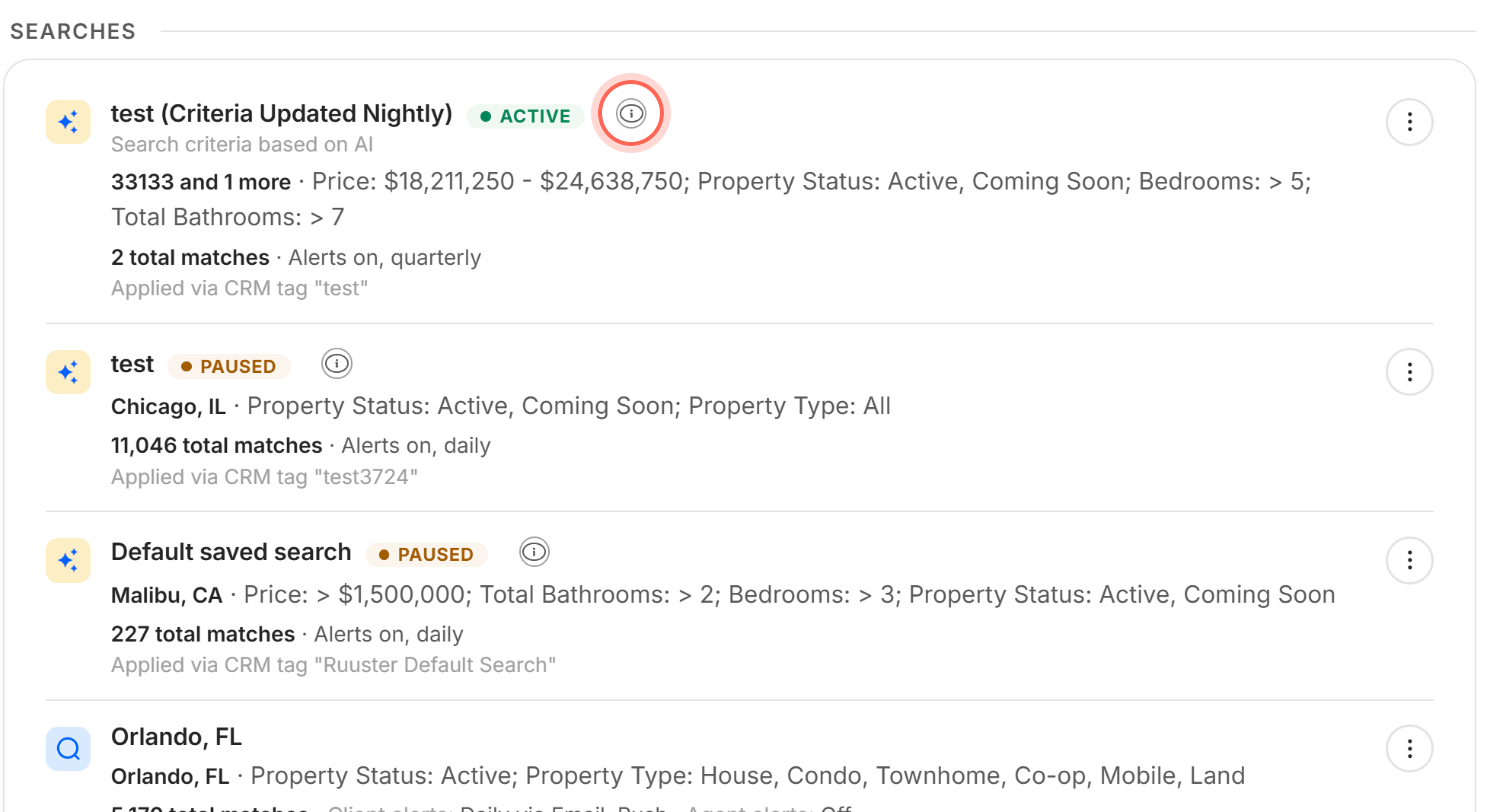
Open the lead's page and go to Searches. The AI search's row shows the criteria Ruuster is using for that lead right now.
| What the row shows | What it means |
|---|---|
| (Criteria Updated Nightly) after the name, and Search criteria based on AI | The criteria come from the lead's own browsing and refresh every night. |
| Search criteria based on fallback search filters | The lead has no recent activity, so alerts use your fallback criteria. |
| The info icon | Click it for a reminder that alerts adapt and may not match the criteria listed. |
When to use it
Count on AI Nurture's picks for leads whose wants you don't know yet. It follows what they look at, so you don't have to guess.
Set the fallback criteria to what you'd send anyone in that group, such as the area your ads target. Fallback criteria can be broad or narrow. They're the starting point, not a limit on what AI Nurture learns.
For a client who told you exactly what they want, use a custom search instead. See Add a search for a client.
Good to know
- Homes for sale only. AI searches never send rentals.
- Edits reach leads at different speeds. New fallback criteria apply to every lead's fallback right away. Leads on AI-based criteria pick up the change at the next nightly refresh.
- Your lead never sees "AI". The emails look like any other property alert from your brokerage.
FAQ
Why did my lead get a home outside the area I set?
The area you set is the fallback. Once your lead browses homes elsewhere, AI Nurture follows their interest, so alerts can go beyond your area.
What are fallback criteria?
They're the area and filters you choose when you create the AI search. Alerts use them whenever a lead has no recent activity to learn from. See Create an AI search.
Why don't the alerts match the criteria on my lead's page?
The criteria refresh every night and adapt as the lead browses, so an email can reflect newer interests. The info icon on the row is there as a reminder.
What happens when my lead hasn't looked at any homes?
They get homes that match your fallback criteria. The row on their page says Search criteria based on fallback search filters.
Can I tell AI Nurture exactly which homes to send one lead?
No. AI Nurture decides from the lead's activity. For exact criteria, add a custom search for that client.
Still need help? Reach out to us at helpme@ruuster.com and we'd be happy to assist!