
What is the Ruuster Default Search?
The Ruuster Default Search tag puts a lead on AI Nurture with your default search as the fallback. See what you can rename or change, and what's locked.
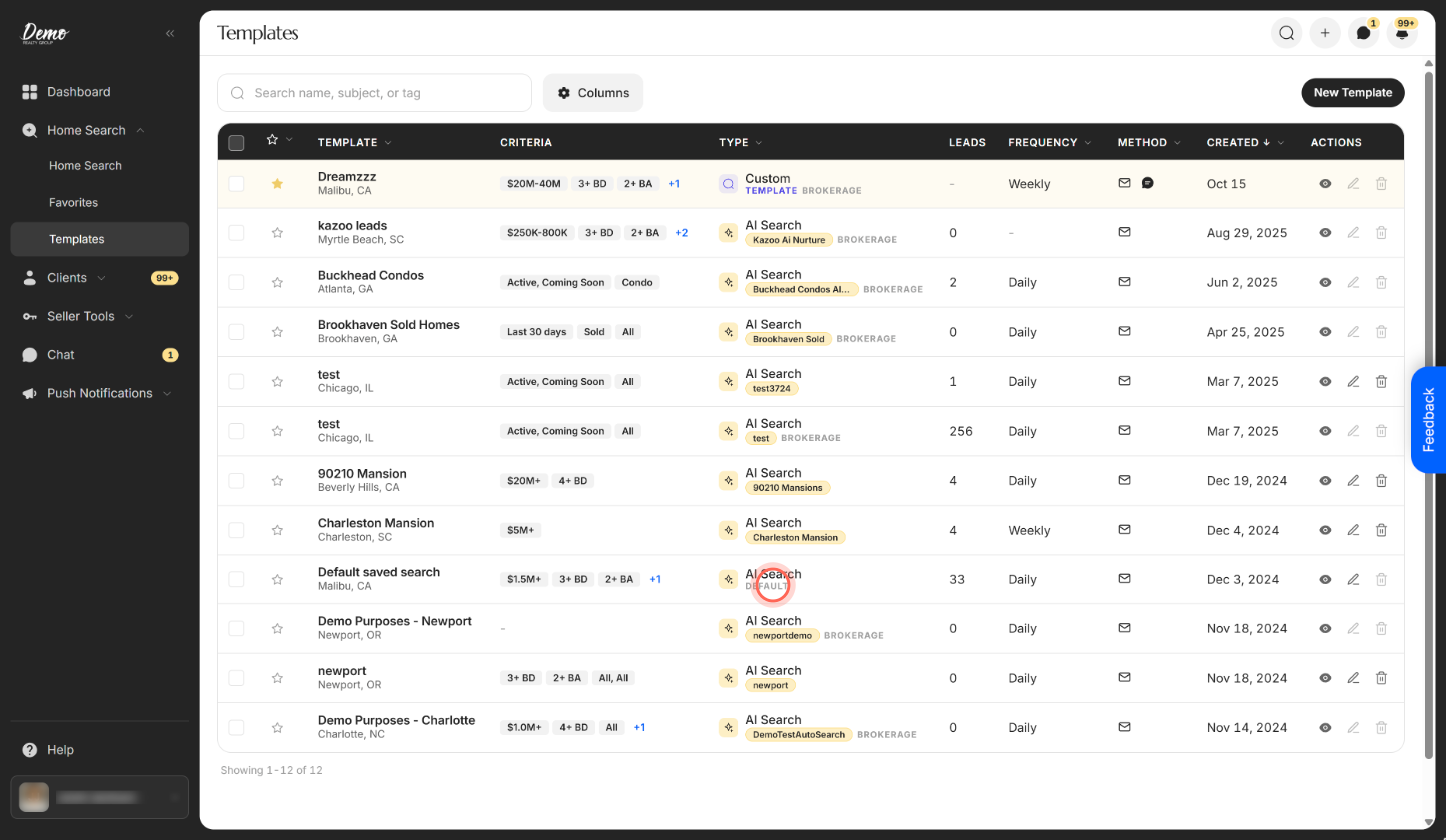
Ruuster Default Search is a CRM tag that puts a lead on your Default AI search. That search's fallback criteria come from your own default search, or your brokerage's if you haven't set one. You can rename it and change its criteria on Templates, but you can't change its tag or delete it.
How it works
- It's on Templates. Your Default AI search has a Default badge in place of a tag.
- The tag is fixed. It's always
Ruuster Default Search, and no other AI search can use it. - Its criteria follow your default search. If you haven't set one, they follow your brokerage's default search.
- Leads join by tag. Add
Ruuster Default Searchto a lead in your CRM. In Ruuster, pick your Default search when you apply an AI search. See Put leads on AI Nurture.
| Part | Can you change it? | Where |
|---|---|---|
| Name | Yes | On Templates, click the Edit icon on the Default row |
| Fallback criteria | Yes | The same Edit form, or set your own default search |
| Tag | No | The Tag* field is locked |
| The search itself | No, it can't be deleted | Delete is unavailable: "The default search cannot be deleted" |
Which default wins
Your own default search wins. To choose yours, see Set your default search.
If you haven't set one, your Default AI search uses your brokerage's default search. Admins manage it, as described in Set the default search for your brokerage (Admin). When an admin changes it, every agent without their own default gets the new criteria.
Apply the brokerage Default across agents (Admin)
Admins only. On All Clients, select leads from more than one agent and choose Apply AI search. The list offers the brokerage Default search, marked Default and Brokerage.
Each lead gets the Ruuster Default Search tag and runs on their own agent's Default AI search.
When to use it
Use it as a catch-all, so no new lead goes without alerts. You can have your CRM add the tag to every new lead. See Put new leads on AI Nurture automatically.
When a group of leads needs different fallback criteria, such as another city, create an AI search with its own tag.
Good to know
- Set your own default to keep your criteria. Without one, a brokerage change replaces your Default search's criteria, even ones you edited on Templates.
- Reassigned leads follow their new agent. When a lead moves to another agent, it runs on the new agent's Default AI search.
- Only one AI search sends at a time. If the lead is already active on another AI search, the Default shows Paused for them.
FAQ
What criteria does the Default Search use?
Your own default search if you've set one. Otherwise, your brokerage's default search.
Can I delete the Default Search or change its tag?
No. You can rename it and change its criteria. To take one lead off it, remove the tag. See Stop or pause AI Nurture for a lead.
Which default wins, mine or the brokerage's?
Yours. The brokerage's default only applies to agents who haven't set their own.
Why can't I use the tag Ruuster Default Search on my own AI search?
It's reserved for the Default search. Ruuster shows "This tag is reserved for the default search." Pick another tag.
What happens when an admin applies the brokerage Default Search?
Each selected lead gets the Ruuster Default Search tag and runs on their own agent's Default AI search, not the admin's.
Still need help? Reach out to us at helpme@ruuster.com and we'd be happy to assist!