
Send an initial alert with a search
Using Ruuster 1.0? Read the 1.0 version of this article.
Send an initial alert so your client gets matching homes right away when you add or update a search.
Yes. Tick Send initial alert under Additional options when you save a client's search, and Ruuster emails them every listing that matches right now. It typically arrives within 15 to 30 minutes, and regular alerts follow on the search's schedule.
Before you start
- The initial alert works on a custom search attached to a client. Templates don't have it, because a template has no recipient.
- It's always an email, so the client needs a working email address.
Send it with a new search
- Start the client's search with Add a search on their page or Save on Home Search.
- Set the area, filters and alert settings.
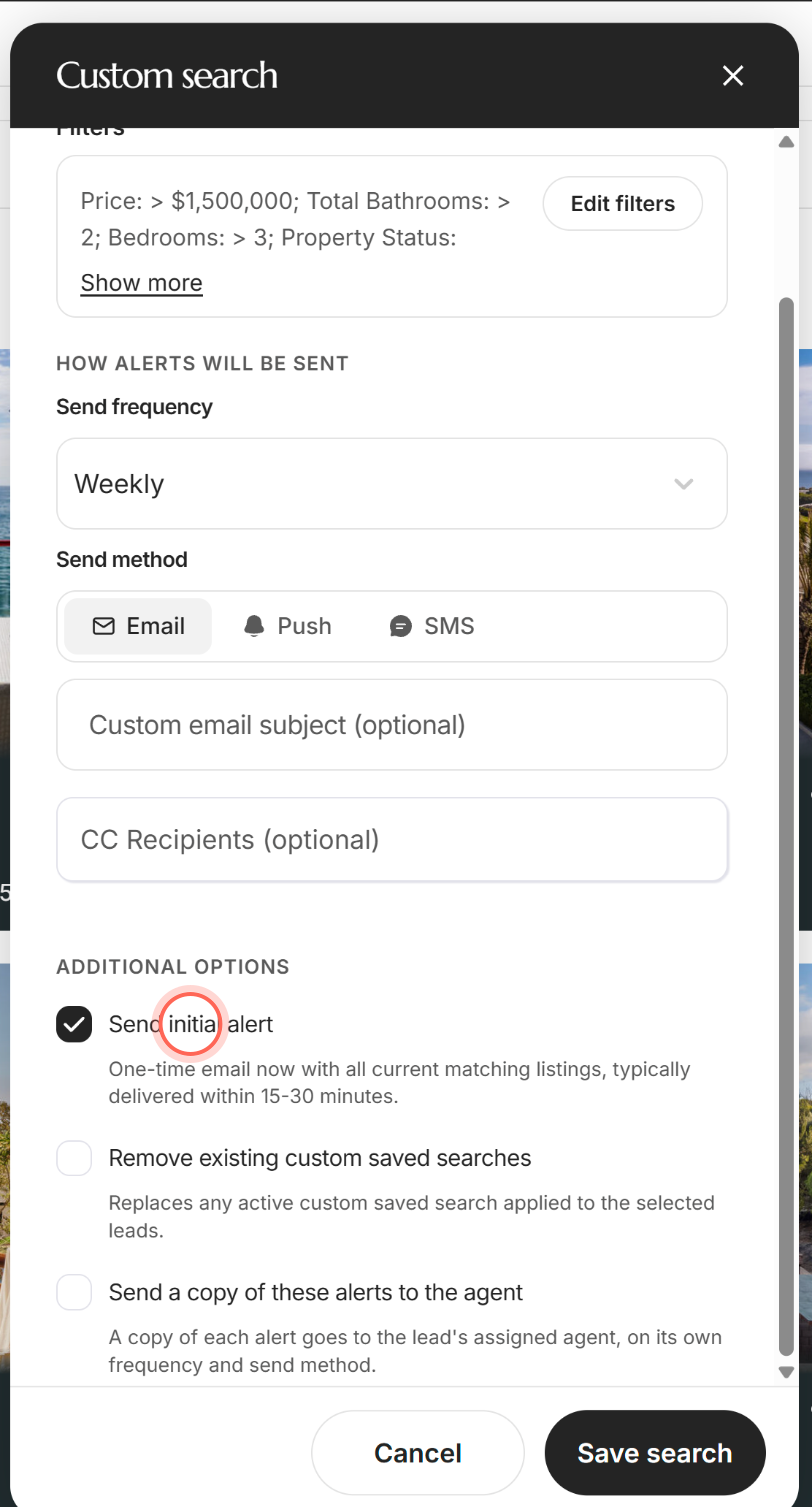
- Under Additional options, tick Send initial alert.
- Click Save search.
Saved search created appears, and the client gets a one-time email with every current match. On Home Search, Additional options shows once you pick a client. For the full flows, see Add a search for a client and Save a search for clients from Home Search.
Send current matches after changing a search
On an existing search, ticking Send initial alert and clicking Save changes stores the setting. The alert goes out the next time you save the area or filters on the map.
- On the client's page, choose Edit from the search's Search actions menu.
- Under Additional options, tick Send initial alert.
- Click Save changes.
- Click the search again to reopen Edit search.
- Click the pen next to Filters (Edit criteria on the map).
- Change the area or filters.
- Click Save in the Saved Search edit mode bar.
Saved search successfully updated appears, and the client gets a one-time email with every listing that matches the new criteria.
Good to know
- Off by default. No email goes out unless you tick the box.
- It stays ticked. Once it's on, each later change to the area or filters sends a fresh initial alert. Untick it in Edit search to stop that.
- Up to four homes in the email. A See latest search results button opens the rest. See What's in a property alert email.
- Recent homes aren't repeated. A home already sent to the client in the last 24 hours is left out.
- AI searches send their own first alert. See What is AI Nurture?
FAQ
My client never got the initial alert. What should I check?
Give it 30 minutes. Then look in Sent emails on the client's page to see whether it went out. If nothing matched, there was nothing to send. See Why isn't my client getting property alerts?
I ticked it while editing, but no email came. Why?
Save changes stores the setting only. The email goes out when you next change the area or filters on the map and click Save.
Why can't I find Send initial alert on my template?
A template has no recipient, so there's nobody to email. The option appears when you apply the search to a client.
Does the first alert go out by text or push too?
No. The initial alert is an email, whatever send methods the search uses.
Still need help? Reach out to us at helpme@ruuster.com and we'd be happy to assist!