
Find your way around your dashboard
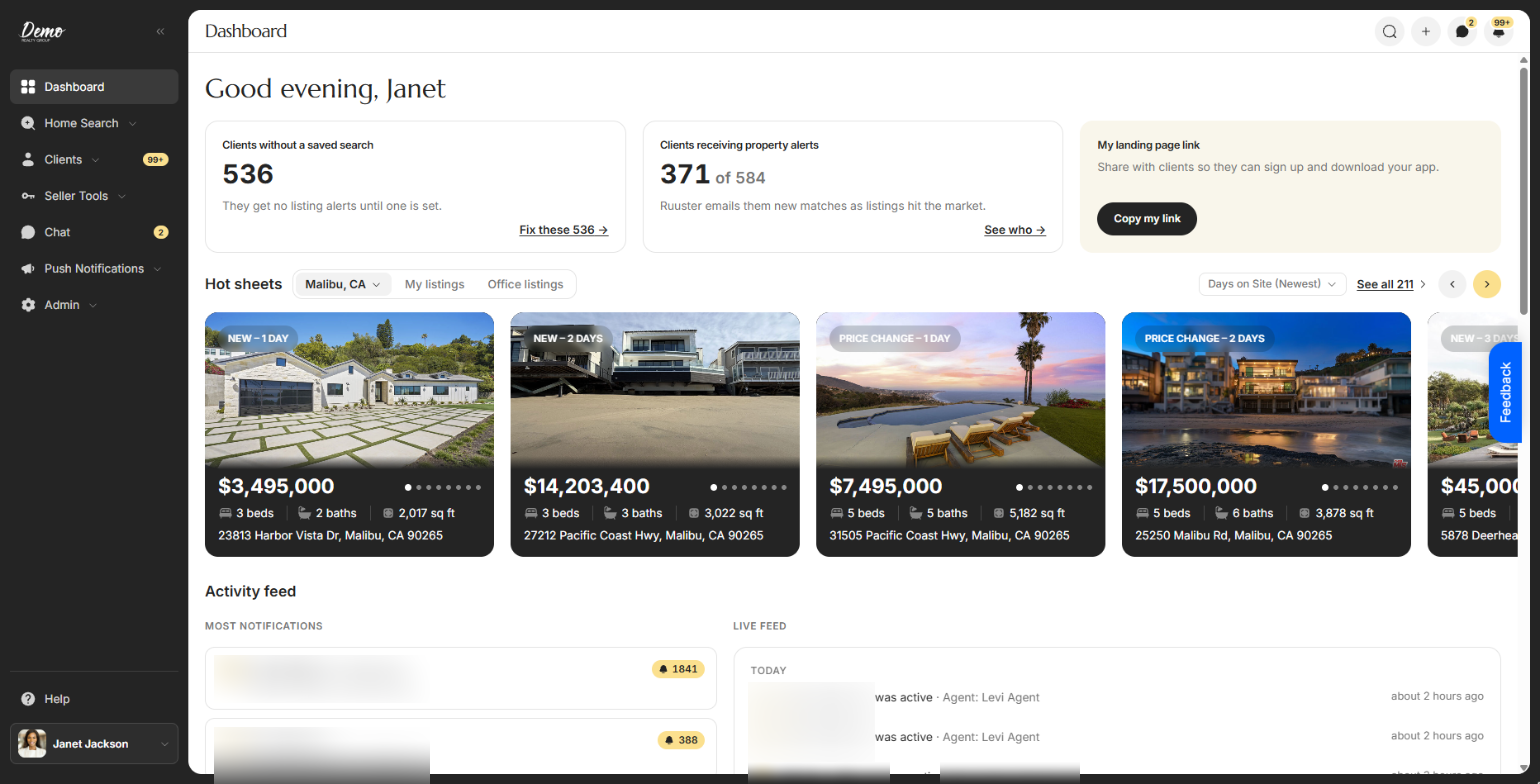
Your dashboard shows clients who need a saved search, who gets alerts, your landing page link, hot sheets, rates, news and live activity.
Dashboard is the first item in the sidebar and the page you land on after signing in. Top to bottom you'll find two client counts, your landing page link, Hot sheets, the Activity feed, Mortgage rates and Market news.
Check your clients and share your link
| Control | What it does | Learn more |
|---|---|---|
| Greeting | Says good morning, good afternoon or good evening by your device's clock, with your first name. | |
| Finish setting up your account: N steps left. | Shows until your setup steps are done. | Complete your setup |
| Finish account setup | Reopens the setup wizard. | |
| X on the setup banner | Hides the banner for good. Its label is Don't show this again. | |
| Clients without a saved search | Counts clients with no saved search. "They get no listing alerts until one is set." Click Fix these N → (or Review clients → at zero) to open All Clients filtered to them. | Add a search for a client |
| Clients receiving property alerts | Shows how many clients get alert emails, as "N of" your total. Click See who → to open All Clients filtered to them. | Find your way around All Clients |
| My landing page link | Click Copy my link to copy your sign-up page address. The button reads Copied for a moment. | Your landing page |
Browse new listings
| Control | What it does | Learn more |
|---|---|---|
| Hot sheets | Shows nine listings, newest first, from your default search, a template, a client's search, My listings or Office listings. | Browse hot sheets on your dashboard |
| Sort menu | Changes the order of the Hot sheets cards, such as Price (High to Low). | |
| See all | Shows the number of matching homes and opens them all in Home Search, in the same order. |
Follow what your clients do
| Control | What it does | Learn more |
|---|---|---|
| Most notifications | Up to 8 leads with activity you haven't seen, most first. Each card shows the unread count, an Unregistered tag for leads who haven't signed up and "Active 2 hours ago". Click a card to open that client. | Notifications and badges |
| Recently active leads | Replaces Most notifications when nothing is unread, and lists leads by their latest activity. | |
| See all under the lead cards | Opens All Clients sorted by notifications, most first. | |
| Live feed | The last 20 client actions from the past 30 days, grouped under Today, Yesterday and earlier dates. Click a client's name to open their page, or a home's address or photos to open the home. | Use the Client Activity feed |
| See all under the Live feed | Opens Client Activity with every action and its filters. | |
| Invite a client | Shows with "No clients yet." when you have no clients. Opens the invite form. | Invite a client |
| See all clients | Shows with "You’re all caught up." when no lead has any activity to rank. |
The Live feed checks for new actions every 15 seconds and the lead cards every 2 minutes. Until clients do something, it reads "No client activity yet."
Check rates and news
| Control | What it does | Learn more |
|---|---|---|
| Mortgage rates | Lists average rates with Current, Previous and Change columns. Optimal Blue updates daily and Freddie Mac weekly. A rise shows in red, a fall in green. | |
| 30 year fixed | Charts the 30 year fixed rate over the last 13 months. Hover the line to read the rate on a date. | |
| Market news | Up to six real estate stories. Click a story or Learn more → to read it in a new tab. | |
| Try again | Shows when a section couldn't load, such as "We couldn't load your leads." or "We couldn't load mortgage rates." Click it to reload that section. |
Good to know
- Phones hide the top cards. On a phone the three cards at the top are hidden so listings come first. On a tablet the landing page card is hidden; copy your link from your account menu instead.
- Admins see the whole brokerage. For admins and owners, the Activity feed covers every agent's clients and names the agent on each action. Agents see their own clients.
- Counts never guess. While the numbers load they shimmer. If they can't load, the two counting cards are left out and the landing page card stays.
- Two copy buttons, two addresses. Copy my link copies your page on the web address you're using now. The copy button in your account menu can use your brokerage's own domain.
- Quiet days are normal. "No rates published today." or "No market news today." means nothing new is out yet. News arrives on weekday mornings.
FAQ
Why does the left side of the Activity feed say Recently active leads?
You've seen all of your clients' activity, so it lists the most recently active leads instead. It switches back to Most notifications when new activity comes in.
Why can't I see the client counts on my phone?
They're hidden on phones on purpose. Open the dashboard on a computer, or use the filters on All Clients.
What does Fix these do?
It opens All Clients showing only clients with no saved search. Add a search to each one so they start getting listing alerts.
Where do the mortgage rates come from?
From FRED, which publishes Optimal Blue averages daily and Freddie Mac averages weekly. The line under the table names the source.
How do I get rid of the setup banner?
Finish the steps in Finish account setup, or click the X on the banner to hide it for good.
Still need help? Reach out to us at helpme@ruuster.com and we'd be happy to assist!