
Browse hot sheets on your dashboard
Hot sheets show nine listings from a search, your listings or your office's. Switch the source, change the sort and open any home.
Hot sheets on your Dashboard shows nine listings from one source, newest first. Click the first button to switch between your default search, your templates and your clients' searches, or click My listings or Office listings. Change the order from the sort menu, click a card to open the home, or click See all for every result.
Before you start
- Hot sheets opens on your default search, set in Settings. Without one, you'll see "No homes found yet."
- My listings and Office listings need your MLS Agent ID(s) and MLS Office ID(s) in Settings.
Switch to a template or a client's search
- In the sidebar, click Dashboard.
- Under Hot sheets, click the first button. It shows your default search's city, or Default search.
- Pick a search under Your templates or Client searches.
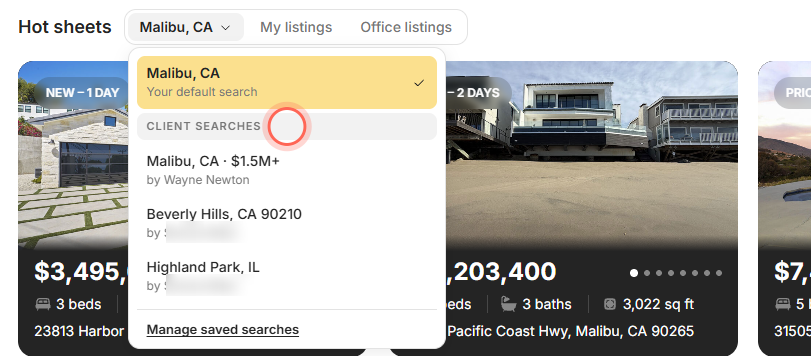
The cards reload and the button shows the search's name. To go back, open the menu and pick the top row, marked "Your default search". Load more at the bottom of the menu lists more searches, and Manage saved searches opens Templates.
Show your own or your office's listings
- On Dashboard, find Hot sheets.
- Click My listings for your own active listings, or Office listings for your office's.
The cards switch to listings under your MLS IDs, newest first. Office listings also includes homes under contract.
Sort the homes
- On Dashboard, find Hot sheets.
- Click the sort menu beside See all. It shows the current order, such as Days on Site (Newest).
- Pick an order, such as Price (High to Low) or Recently Reduced Price.
The cards reload in that order. A template or client search saved with its own sort opens in that order; My listings and Office listings open newest first. On a phone, the sort menu and See all sit on their own line under the source buttons.
Browse and open homes
- Click the arrows beside See all to move one card at a time, or drag the row sideways.
- Click the arrows on a card's photo to page through up to 8 photos.
- Click a card to open that home in Home Search.
- Click See all, or the See all tile after the last card, to open every result.
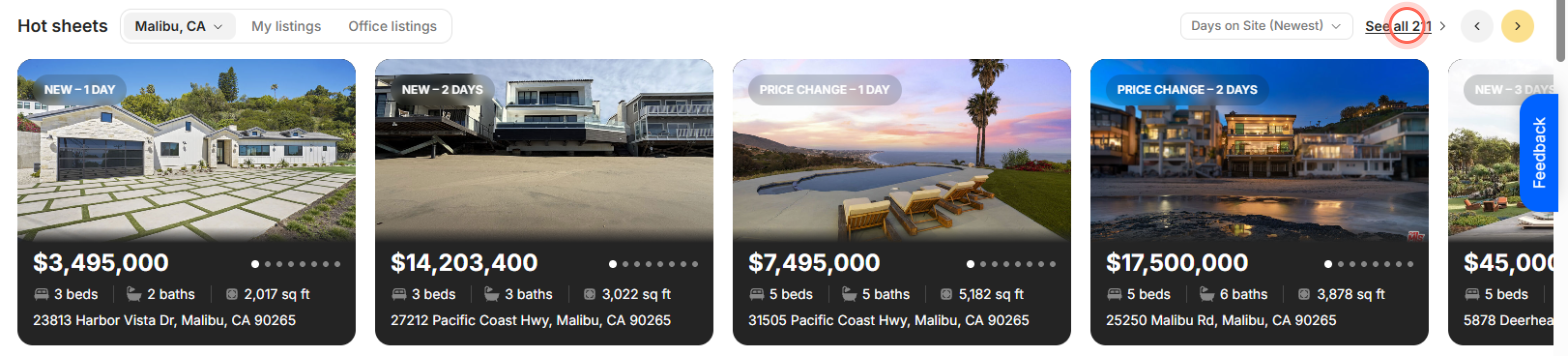
See all carries the number of matching homes, such as See all 128. Home Search opens with the same filters and sort as the source you picked, so the count matches.
Fix an empty Hot sheet
| Message | What to do |
|---|---|
| "No homes found yet." | Click Set your default search and choose the market you work in. |
| "No active listings in" your search | Click Edit this search. It opens Templates, where you can widen the price or area. |
| "Your listings aren't connected yet." | Click Add your MLS agent ID and add it in Settings. |
| "No active listings right now." | Nothing is active under your IDs today. Click Check your MLS IDs if that looks wrong. |
| "Your office isn't connected yet." | Click Add your office ID and add it in Settings. |
| "Your office has nothing on the market." | Click Check your office IDs if that looks wrong. |
| "We couldn't load listings." | Click Try again. |
| "Couldn't load your saved searches." in the menu | Click Try again. "Couldn't load more searches." works the same way. |
| "No saved searches yet" in the menu | Create a template first. |
Good to know
- Nine homes at a time. See all and the last tile show whenever there are cards. The arrows show when the cards don't fit across the screen.
- Badges match Home Search. A card's badge, such as New or Price Change, is the same status Home Search shows.
- Your pick resets. Reloading the dashboard returns Hot sheets to your default search and its own sort.
- No hearts here. Dashboard cards can't be favorited. Favorite a home from Home Search or its details.
- Your default or the brokerage's. If you haven't set your own default search, Hot sheets uses your brokerage's.
FAQ
Where do the homes on my dashboard come from?
From the source chosen in Hot sheets: your default search unless you pick a template, a client's search, My listings or Office listings.
Why does Hot sheets show fewer than nine homes?
The source has fewer than nine homes on the market. A home that comes in from two MLS feeds also shows only once.
Why is a pending home in Office listings?
Office listings includes your office's homes under contract as well as active ones. My listings shows active homes only.
Can I change the search Hot sheets opens on?
Yes. Change your default search in Settings. See Set your default search.
Can I share a home from Hot sheets?
Open the home from its card, then share it from the home's page. See Share a property with clients.
Still need help? Reach out to us at helpme@ruuster.com and we'd be happy to assist!