
Invite a client
Using Ruuster 1.0? Read the 1.0 version of this article.
Send a client a personal invitation from the + menu or All Clients, or share your landing page so they can sign up under you.
Invite a client from the + button in the header or the Invite a client button on All Clients. Fill in their name, email and phone, click Send invitation, and they get a link to create their account under you. No contact details yet? Share your landing page instead.
Before you start
- You need the client's first name, last name, email and phone number. All four are required.
- The client is assigned to you, the person who sends the invite. This is true for admins too. A form opened from a link with details filled in says so at the top.
Send an invitation
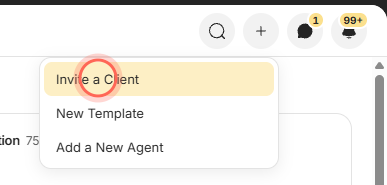
Click the + button in the header, then choose Invite a Client.
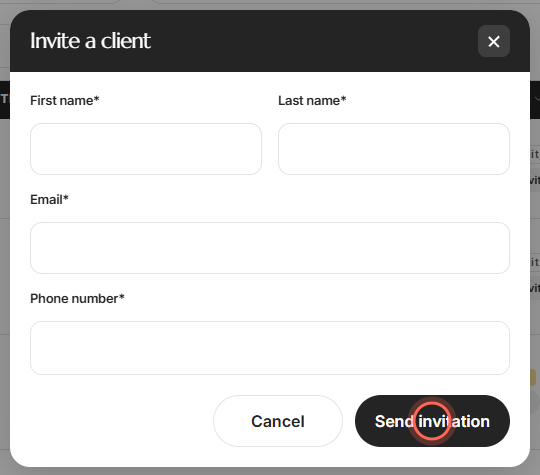
Enter the First name, Last name, Email and Phone number.
Click Send invitation.
A message confirms "Invitation sent to" and the client's name, with "They will get a link to set up their account and start their home search." They appear on All Clients as Invited, then switch to Registered once they finish signing up.
Share your landing page instead
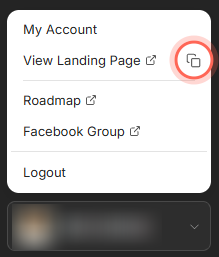
Click your name at the bottom of the sidebar.
Click the copy button next to View Landing Page.
Paste the link into a text, email signature or social profile.
A message confirms "Landing page URL copied". Anyone who signs up from your landing page becomes your client and shows up on All Clients.
Good to know
- One at a time. Invitations go out one client at a time. Clients can also arrive through your CRM integration.
- Other ways in. The Invite a client button on All Clients opens the same form. So does the search palette when it finds no client by the name you typed.
- Inviting twice resends. If you invite someone you already invited, Ruuster sends your original invitation again.
- Nothing is locked in. Cancel closes the form without sending. After you send, you can resend the invite or delete the client if they never sign up.
FAQ
My client never got the invitation. What do I do?
Open All Clients, find their row and click Resend.
How can I tell if my client signed up?
Check the Status column on All Clients. It says Invited until they create their account, then Registered.
Can I invite my whole database at once?
Not in the app. Send invitations one at a time, ideally after you've spoken with the person, or connect your CRM so clients come in automatically.
It says "User already exists in CRM". What does that mean?
That person is already in your brokerage's CRM, either assigned to another agent or already connected to a client in Ruuster. Ask your admin before you invite them again.
It says a phone number is required, but my lead has one. Send invite on a lead's row uses only the details saved on their Ruuster record, and the message names what is missing. Use Invite a Client from the + menu and type their details instead.
What does "Client is already registered" mean?
That email address already belongs to someone on Ruuster in your brokerage, or another agent has invited it. Email helpme@ruuster.com and we'll work out who the client belongs to.
Still need help? Reach out to us at helpme@ruuster.com and we'd be happy to assist!