
Delete a client
Using Ruuster 1.0? Read the 1.0 version of this article.
Delete a client from the menu on their page, or a lead with Delete lead. It is permanent, and leads show Delete lead only when no CRM is connected.
To delete a client, open their page, click More actions on the Client Details card and choose Delete. For a lead who hasn't signed up, click Delete lead on their profile. Either way you type delete to confirm, and it can't be undone.
Before you start
- Deleting removes the client's saved searches, favorites, tour requests and your message history with them. None of it can be recovered.
- Delete lead shows on a lead's profile only when your brokerage has no CRM connected.
Delete a client who signed up
Open the client's page from All Clients.
On the Client Details card, click More actions (the three dots).
Click Delete.
Type delete in Type delete to confirm.
Click Delete client.
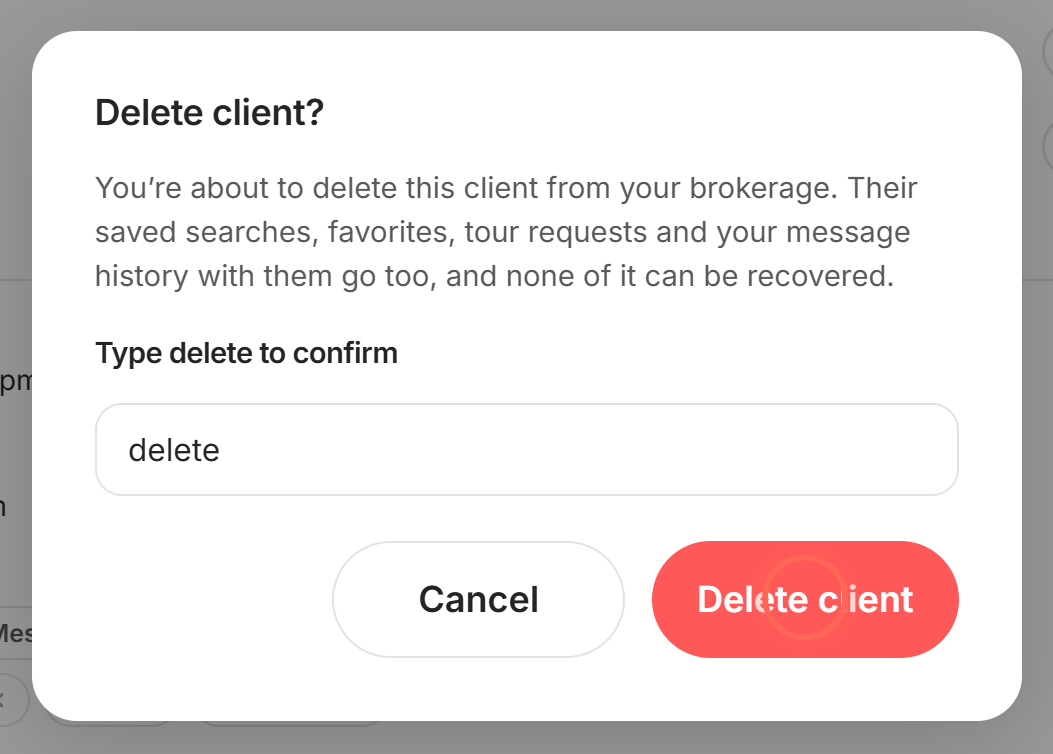
A message confirms "Client deleted successfully", and you're back on All Clients (or the side panel closes).
Delete a lead who hasn't signed up
- On All Clients, click the lead's name to open their profile.
- At the bottom of the Lead details card, click Delete lead.
- Type delete in Type delete to confirm.
- Click Delete lead.
A message confirms "Client was successfully deleted". The lead's property views, email activity, notes and the searches you set up for them are deleted too.
Good to know
- Pending invitation only. If a profile shows only a pending invitation, Delete lead opens Delete this invite only?. Click Delete invite to withdraw it; the lead stays in your list.
- No Delete lead button. With a CRM connected, lead profiles don't offer Delete lead. Clients who signed up still have Delete in More actions.
- Your CRM. If your brokerage has a CRM connected, deleting a client in Ruuster leaves their CRM record as it is.
- Departing agents. Moving or deleting all of one agent's clients is a different flow. See Reassign a departing agent's clients.
FAQ
I deleted a client by mistake. Can support bring them back?
No. Deleting permanently removes the account and everything attached to it. Invite them again to start fresh; their old history doesn't return.
Why don't I see a delete button on a lead?
Your brokerage has a CRM connected, so lead profiles don't show Delete lead. Clients who signed up can still be deleted from More actions.
Why do I have to type "delete"?
The button stays locked until you type the word, so one stray click can't erase a client's history.
I get an error when I try to delete a client. What now?
If you see "Client's account was not deleted", reload the page and try again. If it keeps happening, email helpme@ruuster.com with the client's name.
How do I take a client off a saved search without deleting them?
On their page, open the search's Search actions menu in Searches, click Delete, then Delete search. The client stays; only that search goes. See Find your way around a client's page.
Still need help? Reach out to us at helpme@ruuster.com and we'd be happy to assist!