
Leads who haven't signed up yet
Leads from your CRM show on All Clients before they register. Send them an invite, and see what you can and can't do until they sign up.
An unregistered lead is someone in your client list who hasn't created a Ruuster account yet. They show on All Clients as Invited or Not invited, and you can still send them listings by email. Once they sign up, they become a Registered client.
How it works
Leads arrive from your connected CRM or from an invitation that hasn't been accepted yet. Each one gets a page like a client's, with fewer features until they have an account.
| Registered client | Unregistered lead | |
|---|---|---|
| Status on All Clients | Registered | Invited (invite sent) or Not invited |
| Searches and alert emails | Yes | Yes |
| Activity and sent emails | Yes | Yes |
| Chat and push notifications | Yes | No, they don't have the app yet |
| Favorited Properties | Yes | No, favorites need an account |
| Onboarding answers | After they sign up | Not yet |
The lead's page has a Lead details card. It shows Added to Ruuster, Signed up (Invited or Not invited), Last Active, Invite sent, Assigned Agent and Ruuster Tags.
With a CRM connected, the card also shows the lead's CRM details, as on a client's page. The header offers Text, Call and Email. Contact details can be copied but not edited.
When to use it
- Send listings before the app. Add a search on the lead's page so they get alerts by email. See Add a search for a client.
- Invite when they're ready. Send an invite from the lead's page or their row on All Clients.
- Clean up a list without a CRM. If your brokerage has no CRM connected, you can delete leads you no longer work.
Invite a lead from their page
- On All Clients, click the lead's name.
- In the Lead details card, click Send invite.
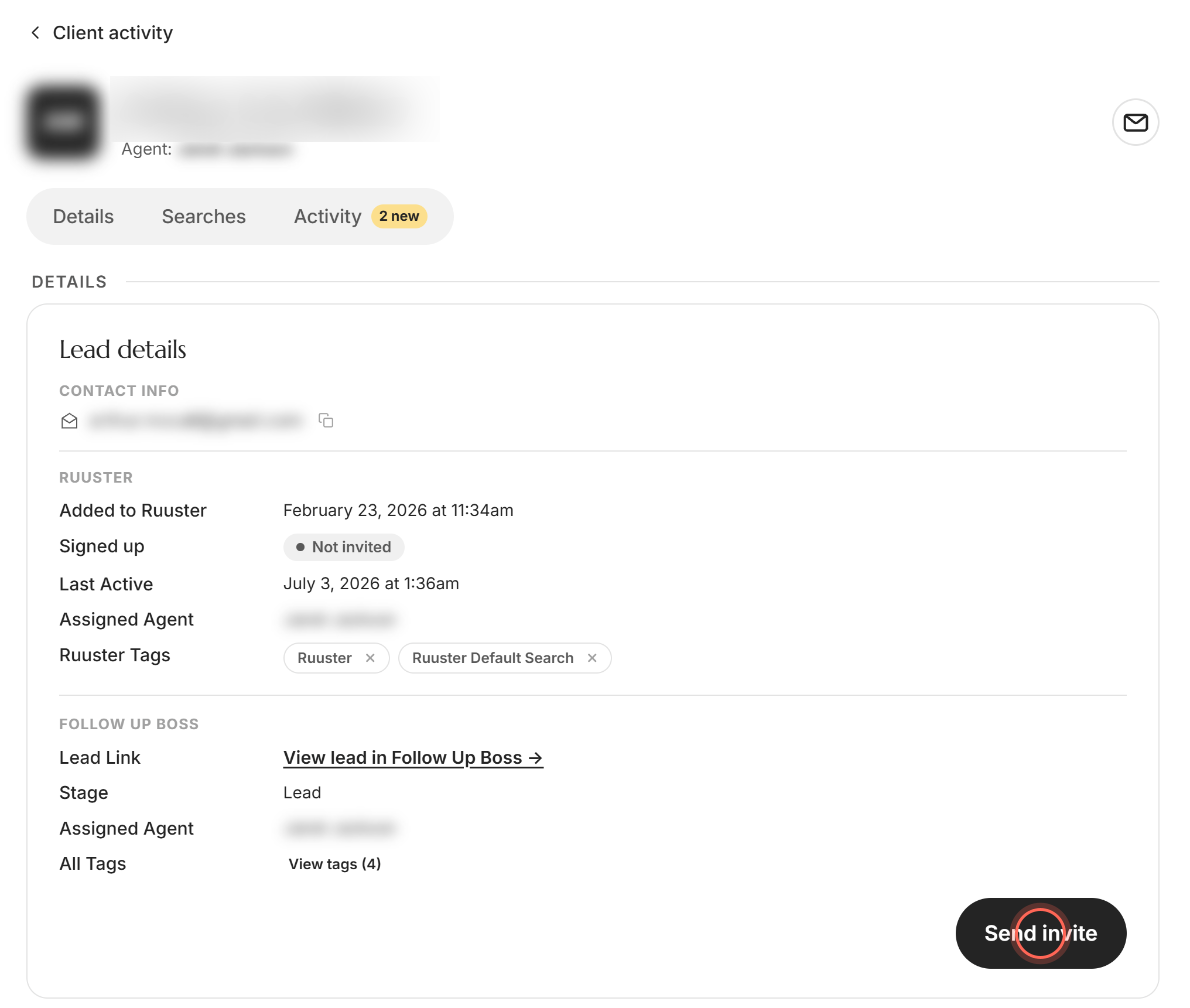
A message confirms "Invite sent to client", and the lead's status changes to Invited. For a lead who was already invited, the button reads Resend invite. To invite someone new, see Invite a client.
Delete a lead
This option shows only when your brokerage has no CRM connected.
- On the lead's page, click Delete lead in the Lead details card.
- Type delete in the box.
- Click Delete lead.
A message confirms "Client was successfully deleted". This is permanent and removes the lead's property views, email activity, notes and searches.
Withdraw a pending invitation
Someone you invited who has no lead record yet has an invitation page with the details section only. Delete lead shows there only when your brokerage has no CRM connected.
- On the invitation page, click Delete lead.
- In Delete this invite only?, click Delete invite.
A message confirms "Client invitation successfully deleted." Their sign-up link stops working. To send it again instead, click Resend invite, or see Resend a client invite.
Good to know
- Missing details block invites. If the lead has no email or phone, you see "Invite can not be sent" with the missing fields.
- Opening a lead clears its badge. When you open your own lead's page, their new activity is marked as seen.
- Signed-up leads move. Once a lead accepts their invite, the lead page says "This lead isn't available." Find them on All Clients as Registered.
- Questionnaire waits for sign-up. The onboarding section says "This lead has not answered the questionnaire." until they finish signing up.
FAQ
Can I set up property alerts for a lead without inviting them to the app?
Yes. Open the lead's page and click Add a search under Searches. They get alert emails without needing an account.
Where do I find my unregistered users?
On All Clients, open the arrow beside Status and tick Invited and Not invited. Admins see leads across the brokerage; agents see their own.
What's the difference between Invited and Not invited?
Invited means you sent an invitation and they haven't signed up yet. Not invited means nobody has sent them one.
Can I bring all my Follow Up Boss leads in at once?
Yes, your admin can. See Bring Follow Up Boss leads into Ruuster in bulk.
Why can't I chat with a lead?
Chat works through the app, and a lead doesn't have an account yet. Use Text, Call or Email on their page, or invite them.
Still need help? Reach out to us at helpme@ruuster.com and we'd be happy to assist!