
Sign in to Ruuster
Sign in at your brokerage's Ruuster address with your email and password, enter the text code, and reset a forgotten password.
Go to your brokerage's Ruuster address, enter your Email and Password, and click Sign in. If we text you a 6-digit code, enter it and click Verify. Your dashboard opens.
Before you start
- Use your brokerage's own address, like yourbrokerage.ruuster.com, or its app. Your account belongs to that brokerage only.
- New to the team? Your admin adds you on Team and you get your sign-in details by email. Your first password is your phone number, digits only, without the country code.
- Keep your phone nearby for the text code.
Sign in
- Open your brokerage's sign-in page.
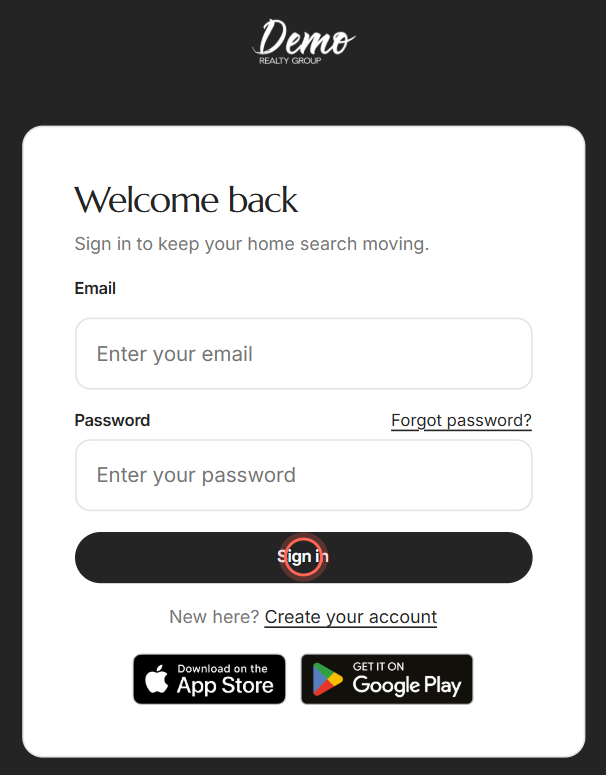
Enter your Email.
Enter your Password.
Click Sign in.
Type the 6-digit code from the text we sent you.
Click Verify.
Your dashboard opens. If you opened a link before signing in, or were signed out while on a page, you land on that page instead.
Verify your phone the first time
New accounts confirm a mobile number once, on Secure your account. If your brokerage has text codes turned off, you won't see this screen.
- Check the Mobile phone number, and fix it if it's wrong.
- Click Send Code.
- Type the 6-digit code from the text.
- Click Verify.
- Click Continue on Your account is protected.
Your dashboard opens and the setup wizard starts. See Complete your setup.
Reset a forgotten password
- On the sign-in page, click Forgot password?
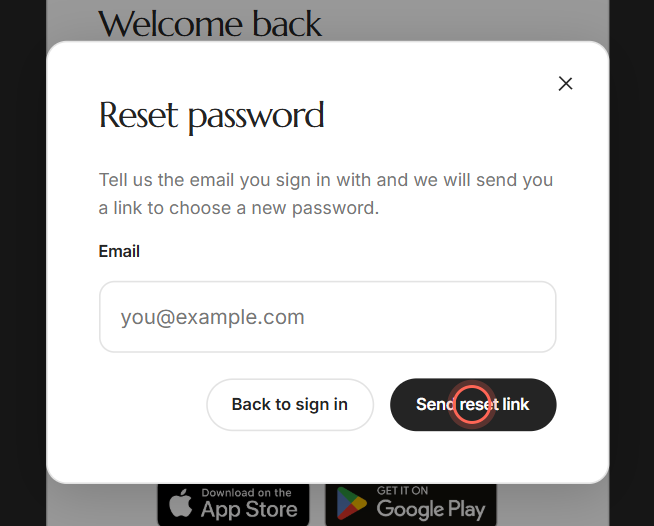
- Enter your Email.
- Click Send reset link.
- Open the reset email and click its button.
- Type the same new password in New password and Confirm new password.
- Click Reset password.
You see "Your password has been reset". Sign in with the new password. It needs eight characters, one uppercase letter, and one number or special character.
Fix common sign-in problems
| What you see | What to do |
|---|---|
| "That email and password do not match our records" | Check you're on your brokerage's own address or app. Then check your email, or click reset your password in the message. |
| "We could not reach the server to sign you in" | Check your connection, then click Try again. |
| "We could not text that number" | Click Try again, or Use a different number to fix it. |
| "That code is not right" | Use the newest text. After the 45-second countdown, click Resend Code. |
| The code went to an old or mistyped number | On Enter your code, click Wrong number? and fix the number. |
| "This reset link no longer works" | Reset links work once and expire. Click Request a new link. |
| "Confirm your new password" or "Passwords do not match" | Type the same new password in Confirm new password, then click Reset password again. |
| Someone else's name on the code screen | Click Log Out next to "Not" and their name, then sign in as yourself. |
Good to know
- Same page for everyone. Agents and clients sign in on the same page. Agents land on their dashboard and clients on their own pages.
- Pages for clients send you home. If you open a page meant for clients, Ruuster takes you to your dashboard.
- Some links sign you in. Links from your connected CRM, like its Expand button, sign you in by themselves. If one has expired, you land on the sign-in page.
- The app registers your phone. Opening your dashboard in your brokerage's app sets that phone up for push notifications.
- Change your password anytime. See Change your password.
FAQ
Is there a separate login for agents on our branded app?
No. Agents and clients use the same sign-in page and app. Ruuster recognizes your account and opens your agent dashboard.
The sign-in page says my email or password doesn't match, but I have an account. What's wrong?
You're most likely on another brokerage's address. Open your own brokerage's address and sign in there, or reset your password.
One of my agents got logged out of the app. What credentials do they use?
Their email and password. If an admin added them and they never changed it, the password is their phone number, digits only, without the country code. Otherwise use Forgot password?.
My clients signed up from my invite, then got logged out. How do they get back in?
They sign in with the email and password they created, at your brokerage's address or app. If they forgot it, they click Forgot password?.
I was told to join my team's Ruuster. How do I get access?
Ask your brokerage admin to add you on Team. You'll get an email with your sign-in details. See Add a team member.
Can I sign in with my phone number instead of my email?
No. Sign in with your email. Your phone receives the 6-digit code.
Still need help? Reach out to us at helpme@ruuster.com and we'd be happy to assist!