
Change your password
Using Ruuster 1.0? Read the 1.0 version of this article.
Set a new password in Settings, or reset a forgotten one with Forgot password? on the sign-in page and the emailed reset link.
Open Settings from My Account, type your new password in New Password and Confirm New Password, and click Save changes. Forgot your password? Click Forgot password? on the sign-in page and we email you a reset link.
Before you start
- A password needs at least 8 characters, an uppercase letter, a lowercase letter, and a number or symbol.
Change your password in Settings
- Click your name at the bottom of the sidebar, then click My Account.
- In Profile, type your new password in New Password.
- Type it again in Confirm New Password.
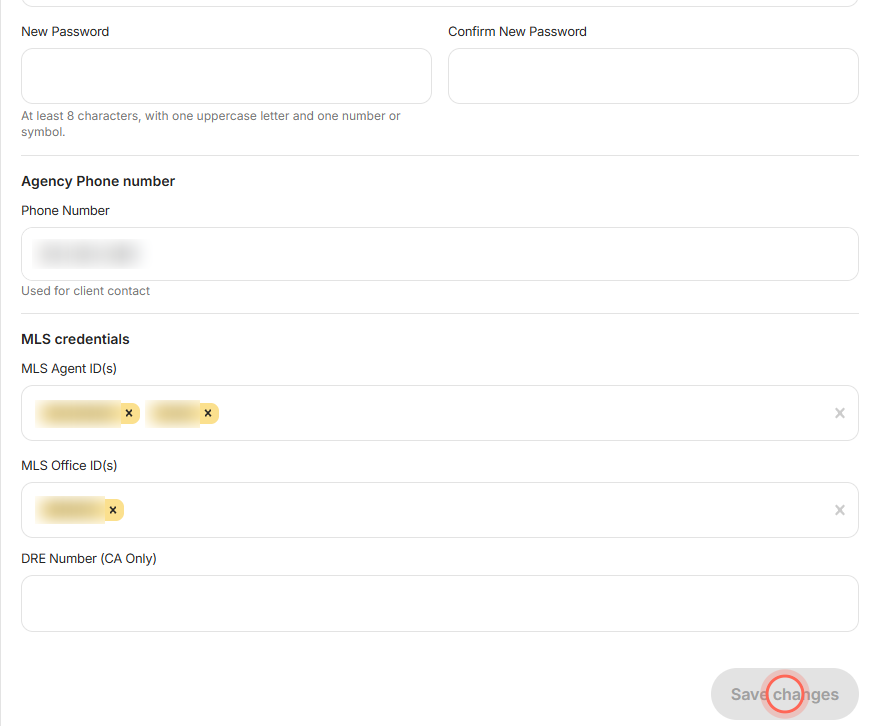
- Click Save changes.
A Success message says "Changes saved." Ruuster also emails you an Account Updated notice. You stay signed in, and you use the new password next time you sign in.
Reset a forgotten password
Use this when you can't sign in. For other sign-in trouble, see Sign in to Ruuster.
- On your brokerage's sign-in page, click Forgot password? next to Password.
- In Reset password, enter the email you sign in with.
- Click Send reset link.
- Open the Reset Your Password email and click Reset password.
- On Choose a new password, type it in New password.
- Type it again in Confirm new password.
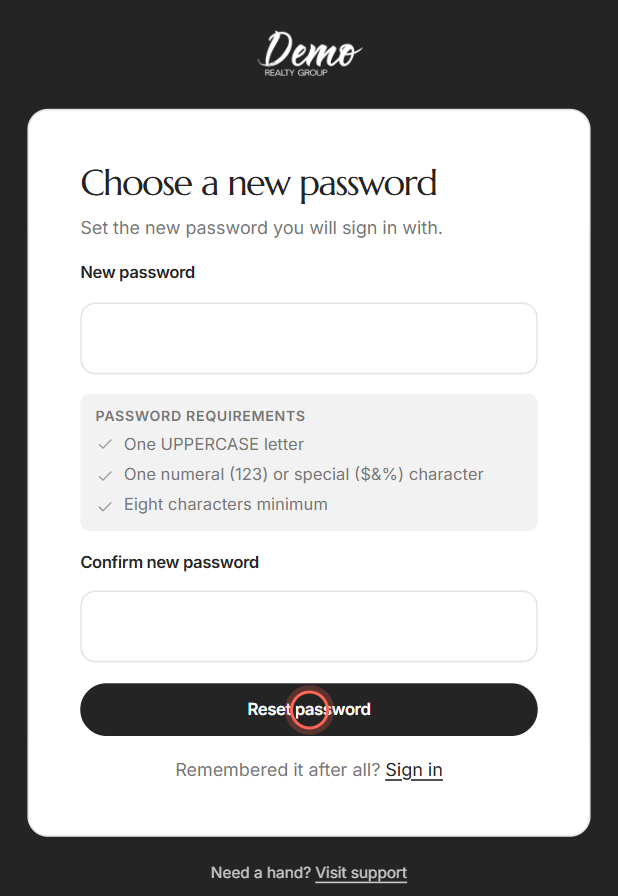
- Click Reset password.
"Your password has been reset" appears. Click Sign in and use your new password.
Good to know
- Live checklist. On Choose a new password, Password requirements ticks off each rule as you type. Include a lowercase letter too.
- Symbols that work. Use letters, numbers and these symbols: ! @ # $ % ^ & * . - and _. Spaces and other symbols make the password invalid.
- Links expire. A reset link works once and stops working after about an hour. Use the newest email right away.
- Ten requests an hour. After 10 reset requests in an hour, you see "Too many password change requests." Wait the minutes shown and try again.
FAQ
My reset link says it doesn't work anymore. How do I reset my password?
"This reset link no longer works" means the link was used, expired or replaced by a newer one. Click Request a new link, then open the newest email right away.
What are the rules for a password?
At least 8 characters, with an uppercase letter, a lowercase letter, and a number or one of ! @ # $ % ^ & * . - _.
Why is Save changes greyed out?
The two fields don't match, or the password breaks a rule. The red line under the field says "Please enter a valid password" or "Confirm password should match."
It says "User with such email was not found." What now?
That email has no account at your brokerage. Enter the exact email you sign in with. Not sure which one it is? Ask your admin.
I didn't get the reset email. Check your spam folder, then ask again in a few minutes. If you asked more than once, use the newest email.
Still need help? Reach out to us at helpme@ruuster.com and we'd be happy to assist!