
Request to delete your account
Request account deletion from Settings. Our team deletes it within 3 business days, and leads you created stay with your brokerage.
Open Settings from My Account, scroll to Delete account at the bottom and click Delete my account, then confirm. This sends a deletion request to our team. Your account is deleted within 3 business days, not right away.
Before you start
- Your profile, landing page and saved searches are deleted. Leads you created stay with your brokerage.
- Leaving your brokerage? Your admin can remove you from Team and hand your clients to another agent instead. See Delete a team member.
Request account deletion
- Click your name at the bottom of the sidebar, then click My Account.
- Scroll to the Delete account card at the bottom of Settings.
- Click Delete my account.
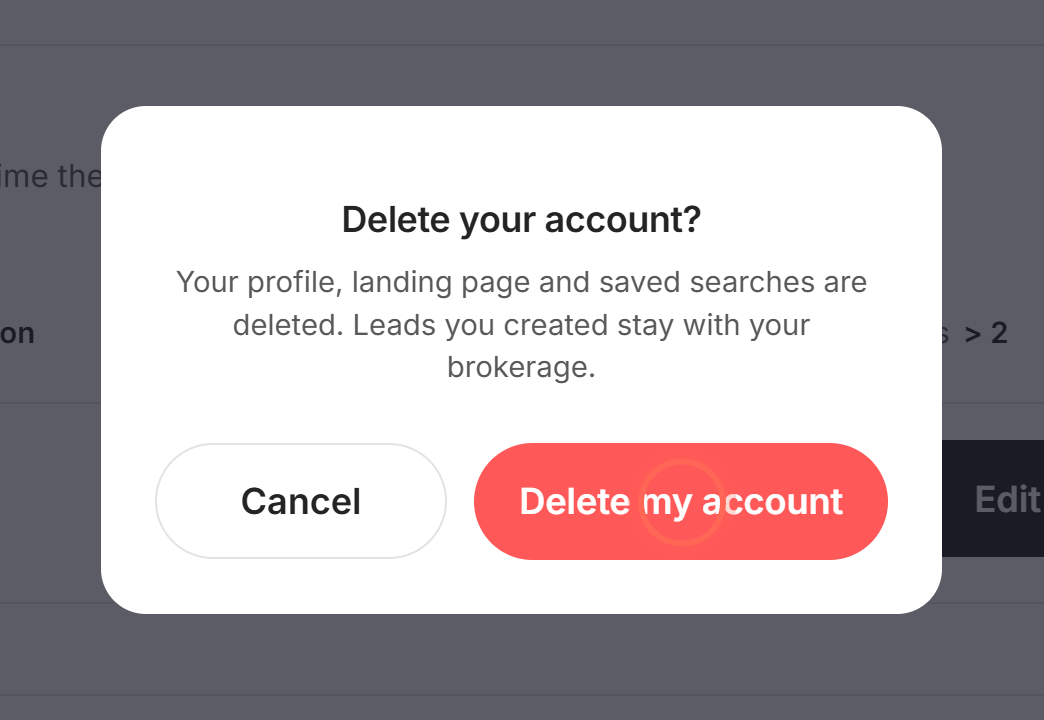
- In Delete your account?, click Delete my account.
- Click Ok to close the message.
After you confirm, the window says "The deletion of your account has been initiated, it will take up to 3 business days to complete." To back out at step 4, click Cancel instead. Nothing is sent.
Good to know
- Not instant. Clicking sends a request to our team. Your account keeps working until our team deletes it. Changed your mind? Email helpme@ruuster.com before then to cancel the request.
- What's deleted. Your profile, landing page and saved searches.
- Your leads stay. Leads you created stay with your brokerage. An admin decides who takes them over, as in Reassign a departing agent's clients.
- Admins too. Admin accounts use the same Delete my account button and get the same request process.
FAQ
How long does it take to close my account?
Up to 3 business days from your request.
What happens to my clients when my account is deleted?
Leads you created stay with your brokerage. Ask your admin who should take them over before you go.
I changed my mind. Can I cancel the request?
Email helpme@ruuster.com right away, before the deletion is finished. Once it's done, the account can't be restored.
It says "Oops! Something went wrong." What now?
Reload the page and try again. If it still fails, email helpme@ruuster.com and we'll take the request by email.
Can I delete an agent who left our team?
Not from Settings. An admin deletes other users from Team and chooses who gets their clients.
Still need help? Reach out to us at helpme@ruuster.com and we'd be happy to assist!