
Find anything with the search palette
Press Ctrl+K or click Search to jump to any client, page or setting in Ruuster, and invite someone new when no client matches.
Press Ctrl+K (Cmd+K on a Mac), or click the magnifier in the header, to open the Search palette. Type a client's name, email or phone, or a page name, and press Enter. If no client matches, it offers to invite them.
Find a client
- Press Ctrl+K (Cmd+K on a Mac), or click the magnifier at the top right.
- In Search clients, pages, settings…, type 3 or more characters of the client's name, email or phone.
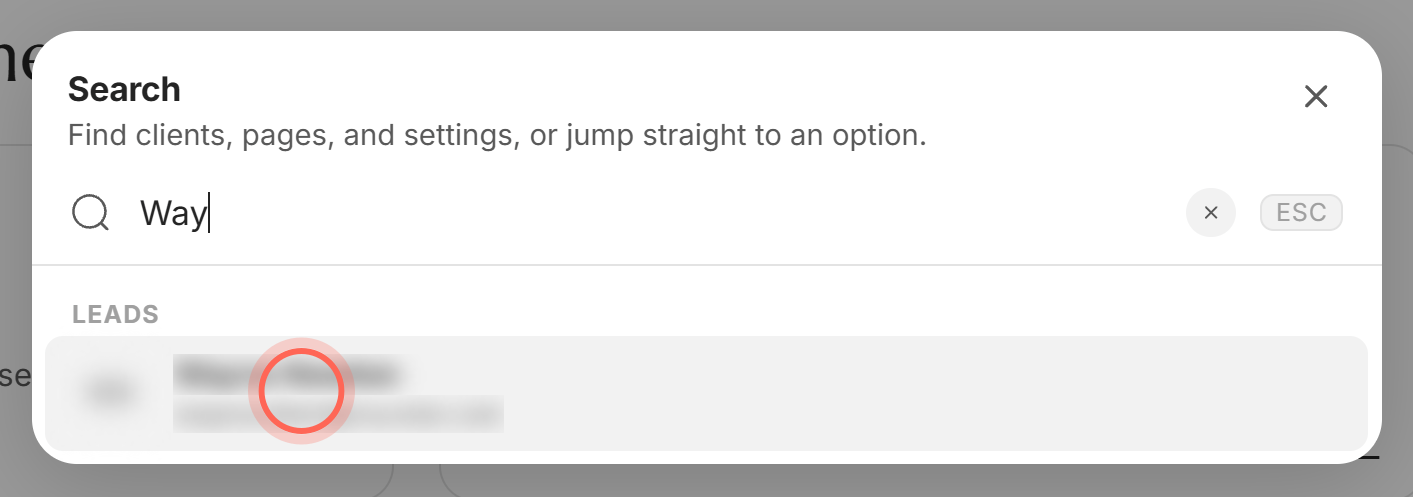
- Click the client under Leads, or press Enter.
Their client page opens. Each result shows the client's initials, name and email (or phone if there's no email).
Jump to a page or setting
- Open the palette with Ctrl+K (Cmd+K on a Mac).
- Type part of a page name, for example "temp" or "push".
- Pick the page under Pages.
The page opens. The palette matches page names and the group they sit in, so "push" finds Create New and History. It also finds the sections of Settings (Profile, Landing page, Default search). View Landing Page opens your public page in a new tab.
Reopen a client you viewed recently
- Open the palette without typing anything.
- Pick a name under Recent.
Recent lists up to 5 clients whose page you opened on this device, however you got there. With no recent clients, the palette shows "Search by name, email or phone."
Invite someone who isn't a client yet
- Type the person's name, email or phone (at least 3 characters).
- Click Invite a new client at the bottom of the results.
- Fill in the Invite a client form, then click Send invitation.
All Clients opens with the form ready, and you see "Invitation sent to" and their name. What you typed in the palette isn't copied into the form. See Invite a client.
Good to know
- Three letters for clients. Pages match from the first letter. Clients need 3 characters, and until then you see "Type at least 3 characters to search clients."
- Same people as All Clients. Agents find their own clients, admins find everyone in the brokerage, including leads who haven't signed up. See Find your way around All Clients.
- Recent stays on this device. Another computer or browser starts with an empty list.
- Keyboard moves. Up and Down move through results and wrap around, Enter opens, Esc closes.
- No homes here. The palette finds clients and pages, not listings. Search homes in Home Search.
FAQ
What does Ctrl+K do in Ruuster?
It opens the search palette from any page, and pressing it again closes it. On a Mac, use Cmd+K.
Why doesn't my lead show up when I start typing?
Clients appear after 3 characters. If you're an agent, you only find clients assigned to you.
It says No matches. What now?
Nobody and no page matched your text. Check the spelling, try their email or phone, or click Invite a new client.
Can I look up a property address here?
No. Use Home Search for addresses and listings.
How do I clear what I typed or close the search box?
Click the x inside the search box to clear it. Press Esc, click the x in the corner, or click outside to close.
Still need help? Reach out to us at helpme@ruuster.com and we'd be happy to assist!