
Get help inside Ruuster
Click Help in the sidebar to search articles, ask a question or message the Ruuster team without leaving the page you're on.
Click Help at the bottom of the sidebar to open Ruuster Help in the corner of your screen. From there you can search articles, ask a question, or message our team without leaving your page. You can also email helpme@ruuster.com.
Open the Help panel
- Click Help at the bottom of the sidebar. On a phone, tap Menu first.
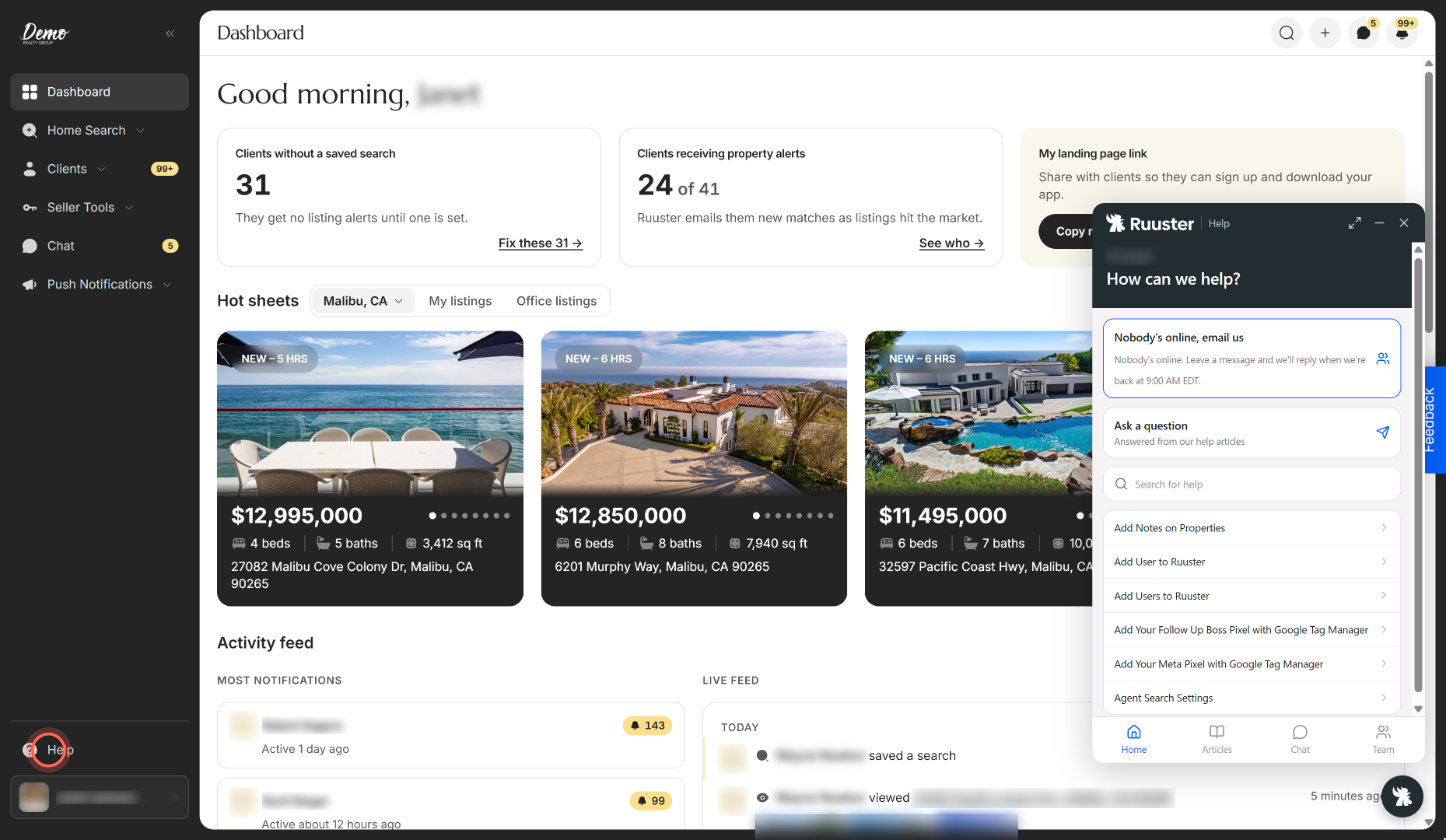
- Type what you need in Search for help, or pick an article from the list.
The panel opens in the bottom-right corner and greets you by first name. Its tabs are Home, Articles, Chat (answers from our help assistant) and Team (messages with our support team).
Ask a question
- Click Help at the bottom of the sidebar.
- Click Ask a question.
- Type your question in your own words and send it.
You get an answer drawn from the help articles, with links to read more.
Message the Ruuster team
- Click Help at the bottom of the sidebar.
- Click Message our team.
- Type your message and send it.
The panel shows whether the team is available right now. Replies appear in the panel's Team tab with an unread badge. When the conversation ends, we email you a copy of the whole chat.
If nobody's online, the button reads Nobody's online, email us, and our reply comes by email.
Reach support when you can't sign in
- On the sign-in page, click Visit support next to "Need a hand?".
- On the Support page, click Email support.
- Write your email address and what you were doing, then send.
The email goes to helpme@ruuster.com with your brokerage's name in the subject. Under Other ways to reach us, the page also lists:
| Channel | Use it for | How to reach it |
|---|---|---|
| Help center | Guides, answers and live chat | The help center link on the page |
| Sales | New accounts and billing questions | sales@ruuster.com or 312-948-5402 |
Good to know
- A number on Help. It counts new announcements waiting in the panel. Open the panel to read them.
- Agents and admins only. Clients don't see the Help button. They have their own help links in their account menu.
- If Help won't open. The panel loads from help.ruuster.com. If your network blocks that site, the button does nothing, so email helpme@ruuster.com.
- Not inside your CRM. The Ruuster panel inside your connected CRM has no Help button. Open Ruuster in its own tab to get help.
- Missing a search filter? Ask for it from Home Search. See Ask for a filter your MLS has.
FAQ
Can we schedule a training or overview for our team?
Yes. Click Message our team in Help, or email helpme@ruuster.com, and say what your team wants to cover.
Do you have marketing materials to promote our app to clients?
Yes. Our team can send marketing material for your app. Ask through Message our team in Help, or email helpme@ruuster.com.
What's the Ruuster support email?
helpme@ruuster.com. Use it for anything broken or any issue you want to report.
How do I suggest a new feature?
Use the Feedback button or vote on the Roadmap. See Send feedback or request a feature.
Does the help panel take me away from my work?
No. It opens on top of the page you're on, so you can follow the steps while you click.
Still need help? Reach out to us at helpme@ruuster.com and we'd be happy to assist!