
Turn the client questionnaire on or off
Using Ruuster 1.0? Read the 1.0 version of this article.
Turn the client onboarding questionnaire on or off for your brokerage, see what new clients are asked, and find their answers.
Admins only. New clients answer a short onboarding questionnaire when they join. To stop it, open Client Onboarding (Admin) and switch on Turn off the onboarding questionnaire; the change saves right away for your whole brokerage.
Before you start
- You need to be an admin. The setting covers every agent's new clients.
Turn the questionnaire off
In the sidebar, go to Admin > Global Settings > Client Onboarding.
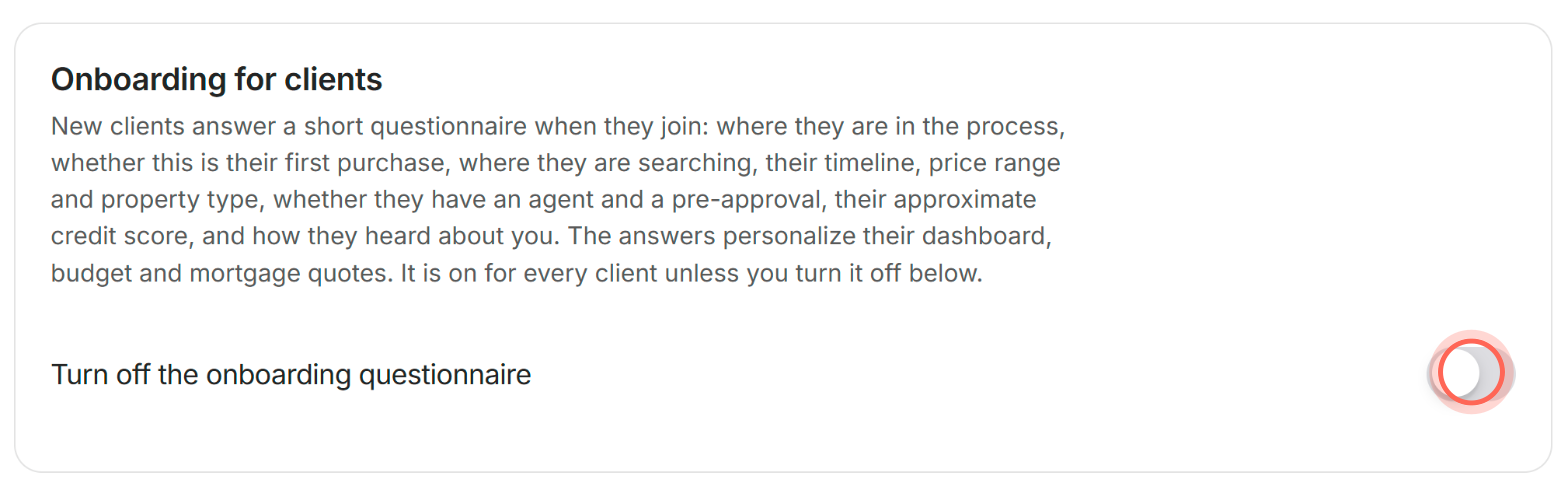
Switch on Turn off the onboarding questionnaire.
The switch saves on its own, with no Save button. New clients now go straight into the app after they sign up.
Turn the questionnaire back on
- In the sidebar, go to Admin > Global Settings > Client Onboarding.
- Switch off Turn off the onboarding questionnaire.
New clients answer the questionnaire again when they join. It is on by default.
What new clients are asked
The Onboarding for clients card lists the topics. Clients are asked:
- Where they are in the process, and whether this is their first purchase
- Where they are searching, their timeline, price range and property type
- Whether they have an agent and a pre-approval
- Their approximate credit score
- How they heard about you
The answers personalize the client's dashboard, budget and mortgage quotes.
See a client's answers
- Open All Clients and click the client's name.
- Expand Onboarding Answers on their page.
For everything else on that page, see Find your way around a client's page.
Good to know
- All or nothing. You can't hide single questions or change the wording. The switch turns the whole questionnaire on or off.
- Brokerage-wide. There is no per-agent or per-client version of this setting.
- New client emails. Agents get their new client email when a client finishes the questionnaire, or at sign-up when it's off. The email includes the answers.
- If the switch doesn't save. A message says "We couldn't update the onboarding settings." Check your connection and try again.
FAQ
Can a client skip the signup questions on their own?
No. While the questionnaire is on, clients complete it as part of joining. Only this brokerage-wide switch skips it.
If I turn the questionnaire off, what happens to answers clients already gave?
They stay on each client's page under Onboarding Answers. The switch only changes what happens when clients join.
Can I add my own questions to the client intake?
No. The questionnaire is a fixed set of topics, listed on the Client Onboarding page.
The page says "We couldn't load the onboarding settings." What do I do?
Check your connection and click Try again.
Still need help? Reach out to us at helpme@ruuster.com and we'd be happy to assist!