
Resend or withdraw a team invite
Using Ruuster 1.0? Read the 1.0 version of this article.
Resend sign-in details to a user who hasn't logged in, or withdraw an invitation you no longer need.
Admins only. On Team (Admin), find the person with the Invited badge and click Send login info to email their sign-in details again. To cancel the invitation instead, click the trash icon on their row and click Withdraw invitation.
Before you start
- Admins only. Any admin can resend or withdraw an invite, not only the one who sent it.
- These options only show for people who haven't signed up yet. Their Activity cell shows Invited.
Resend sign-in details
- In the sidebar, click Team under Admin.
- Type their name in Search name, email or MLS ID.

- Click Send login info next to their Invited badge.
A Login info sent message says "A welcome email is on its way to" their email address.
Fix their email or phone, then resend
- On Team, click the invited person's name to open Edit user.
- Correct the Email or Phone.
- Leave Send login credentials ticked.
- Click Save changes.
A Login info sent message names the address the welcome email went to. If you see Could not send login info, your changes were saved, so click Send login info on their row to try again.
Withdraw an invitation
- On Team, click the trash icon (Delete user) on the invited person's row.
- Type delete in Type delete to confirm.
- Click Withdraw invitation.
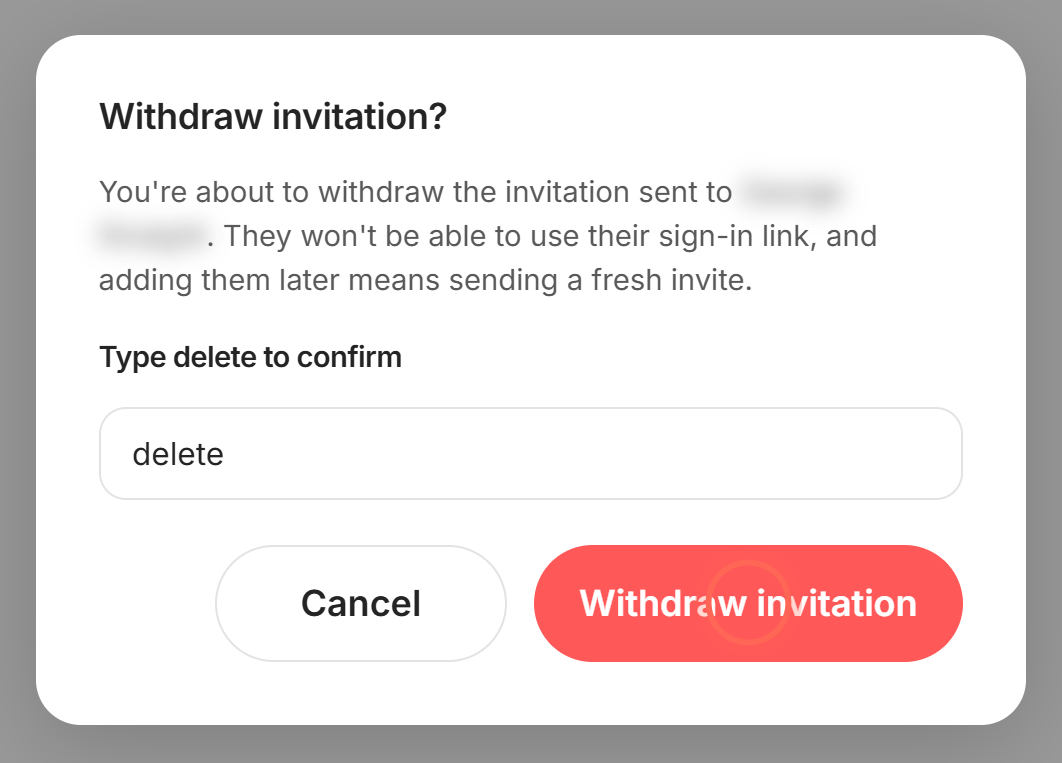
An Invitation withdrawn message confirms it. Their sign-in link stops working, they leave Team and their seat frees up.
Good to know
- What the email holds. The welcome email has their sign-in details. Their phone number is their first password, and they change it when they first sign in.
- A new phone is a new password. For an invited person, changing Phone also makes the new number their first password.
- Signed up already? Send login info disappears once they sign up. If they forgot their password, they click Forgot password? on the sign-in page.
- Adding them again. After you withdraw an invitation, you can add the same person with a fresh invite (see Add a team member).
FAQ
My agent says the email still hasn't arrived. What next?
Ask them to check spam. Then check the email on their Team row. If it's wrong, fix it and resend. If it's right and still nothing arrives, reach out to us.
Can I resend an invite another admin sent?
Yes. Any admin on your account can click Send login info.
How do I cancel an invite I sent to the wrong email?
Either fix the email in Edit user and resend, or withdraw the invitation and add them again.
Can someone who already signed in get a new welcome email?
No. Once they've signed up, they reset their own password with Forgot password? on the sign-in page.
Still need help? Reach out to us at helpme@ruuster.com and we'd be happy to assist!