
Add seats to your account
When every seat is in use, Add user on Team opens Add more user seats. Pick how many; your limit rises right away and billing follows up.
Admins only. When every seat is in use, clicking Add user on Team (Admin) opens Add more user seats. Choose how many seats to add and click Add seats. Your limit goes up right away, and our billing team follows up with the updated details.
Before you start
- Admins only.
- Check your usage at the top of Team, for example "All users on your brokerage account · 16 of 150 seats used".
- Everyone on Team takes a seat, including invited people who haven't signed up yet.
Add seats when every seat is in use
- In the sidebar, click Team under Admin.
- Click Add user.
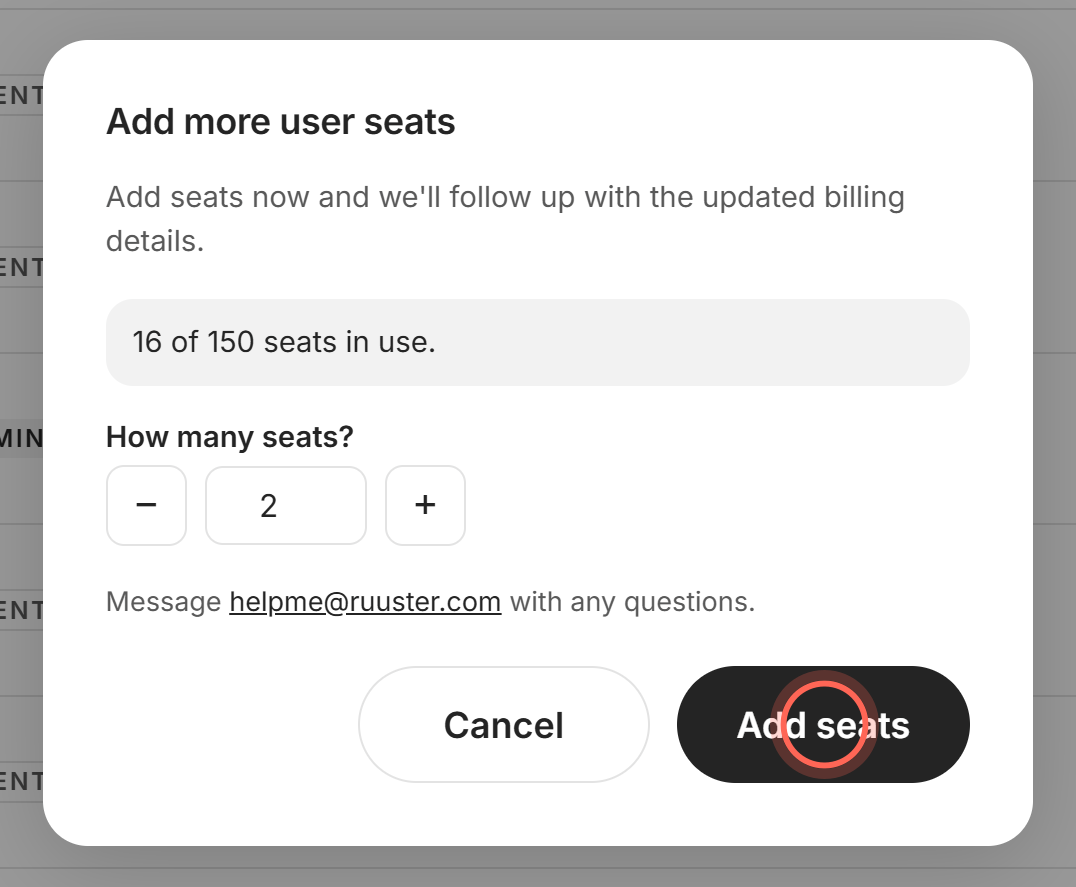
- Under How many seats?, click the plus or minus button, or type a number.
- Click Add seats.
- Click Done in the Seats added message.
- Finish the Add a new agent form that opens (see Add a team member).
The Seats added message says "We've added" and the number of additional seats, and that billing will follow up. The seat line at the top of Team shows your new limit.
Add seats while you're adding an agent
- In the Add a new agent form, click Buy more licenses next to the seat count.
- Under How many seats?, set the number of seats.
- Click Add seats.
- Click Done in the Seats added message.
The Add a new agent form opens again with everything you typed still there. Buy more licenses shows only when your account has a seat limit.
If the form shows No seats available and "Every seat on your account is in use.", click Add seats there instead. The same steps follow, and your typing is kept.
Good to know
- Nothing is charged in Ruuster. Your limit rises right away, and billing contacts you about the updated invoice.
- 1 to 999 at a time. You can add up to 999 seats in one go.
- Free a seat instead. Deleting someone or withdrawing an invitation frees their seat (see Delete a team member).
- No seat limit set. If Team says "no seat limit set", you can add people without adding seats.
- Questions first? The seats window says "Message helpme@ruuster.com with any questions." Cancel closes it without changes.
FAQ
We're out of seats and need to add a new agent. How do I get more seats?
On Team, click Add user. At your limit, it opens Add more user seats. Add seats, click Done, and finish adding the agent.
How much does an extra seat cost?
Pricing depends on your agreement with Ruuster. Email helpme@ruuster.com and we'll confirm it. See Billing, seats and your subscription.
Does our generic company profile count as a seat?
Yes. Every account on Team counts as a seat, including a company profile.
Can I remove seats later?
Not in Ruuster. Email helpme@ruuster.com to lower your seat count.
Why did Add user open a seats window instead of the form?
Every seat on your account is in use. Add at least one seat and the form opens after you click Done.
Still need help? Reach out to us at helpme@ruuster.com and we'd be happy to assist!