
Make visitors sign up to see listings
Turn on forced registration in your listings embed or share links, and choose when the sign-up form appears, so visitors become leads.
Admins only. On Embed Listings (Admin), turn on Forced registration and choose when the form appears in Show the form after. Visitors then sign up before they open property details, and each becomes a lead for the snippet's agent.
Before you start
- Admins only. Embed Listings is under Admin in the sidebar.
- You need a Listings Search snippet on your site. See Put Ruuster listings on your website.
- For links you share, registration is set on the link itself. See Share a search link to get new leads.
Turn on forced registration for your website
- In the sidebar, click Embed Listings under Admin.
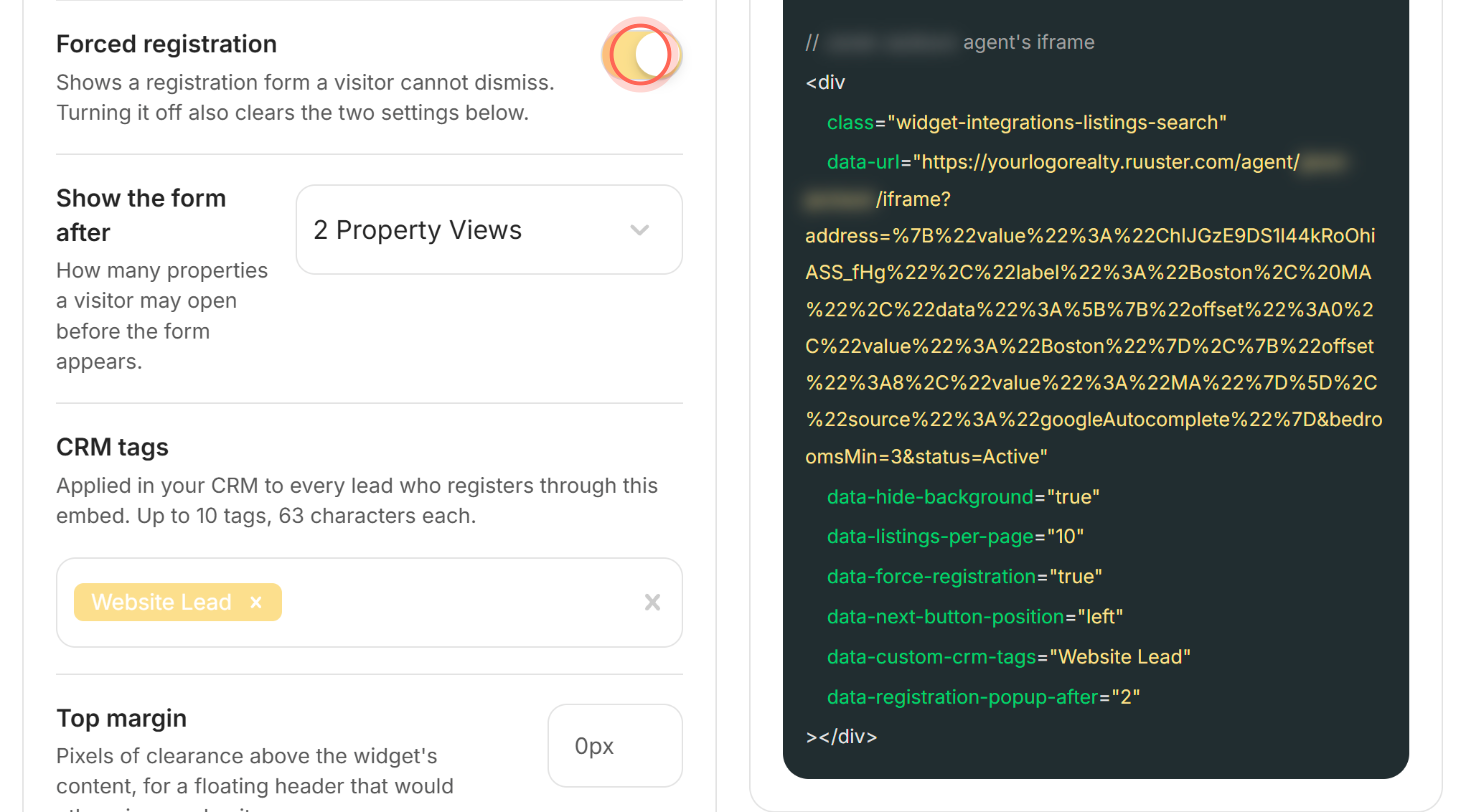
- On the Listings Search (IDX) tab, turn on Forced registration.
- In Show the form after, choose how many properties a visitor can open first.
- Optional: in CRM tags, type a tag and press Enter.
- Under Agents, pick the agent who gets the sign-ups.
- Copy the code under Listings Search widget code.
- Replace the old snippet on your web page with the new one.
To check it, open your web page in a private window and open properties. The Free access form appears once the visitor passes the number you chose.
Choose when the form appears
| Show the form after | When visitors see the form |
|---|---|
| 0 Property Views (Immediately) | As soon as they open their first property |
| 1 Property View to 10 Property Views | After they've opened that many different properties, on the next one |
What visitors see
The Free access form asks for First Name, Last Name, Email and Phone Number, and says the phone number is "Also used as your password".
The visitor clicks Continue and a new tab opens to finish signing in. The form has no close button, so the only way past it is to sign up.
Good to know
- Browsing stays open. Visitors can scroll the results and the map. The form appears when they open a property's details.
- Turning it off clears its settings. Switching off Forced registration also clears Show the form after and CRM tags.
- Counts are per browser. Ruuster counts the properties opened in that browser, so a new device or cleared browser starts at zero.
- CRM tags need a CRM. CRM tags shows only when your brokerage has a CRM connected. Add up to 10 tags of 63 characters each.
- Track sign-ups as conversions. With a Google Tag Manager ID saved, each registration sends an event. See Track lead conversions with Google Tag Manager.
FAQ
Can visitors see some homes before they have to sign up?
Yes. Choose 1 to 10 in Show the form after. They can open that many properties before the form appears.
Where do the people who register go?
They become clients of the snippet's agent and appear on All Clients. With a CRM connected, they're sent there too, with your CRM tags.
Can a visitor skip or close the form?
No. The form can't be dismissed, so visitors sign up to keep viewing property details.
I turned it on but nothing changed on our site. Why?
Settings live in the code. Copy the new snippet from Embed Listings and replace the old one on your page.
Still need help? Reach out to us at helpme@ruuster.com and we'd be happy to assist!