
Share a search link to get new leads
Using Ruuster 1.0? Read the 1.0 version of this article.
Copy a long or short link to any search, add a sign-up wall, tags or UTM codes, and share it. People who sign up become your leads.
On Home Search, set up your search and click the share icon next to Save. Copy the long or short link in the Share link window and post it anywhere. People who sign up through it become your leads, and Advance share options adds a sign-up wall, tags and UTM codes.
Before you start
- You need an agent account. Advance share options only shows for agents.
- The link copies the search as it is on screen: places, filters and sort order.
Share your search results
- On Home Search, pick your places and filters.
- Click the share icon next to Save.
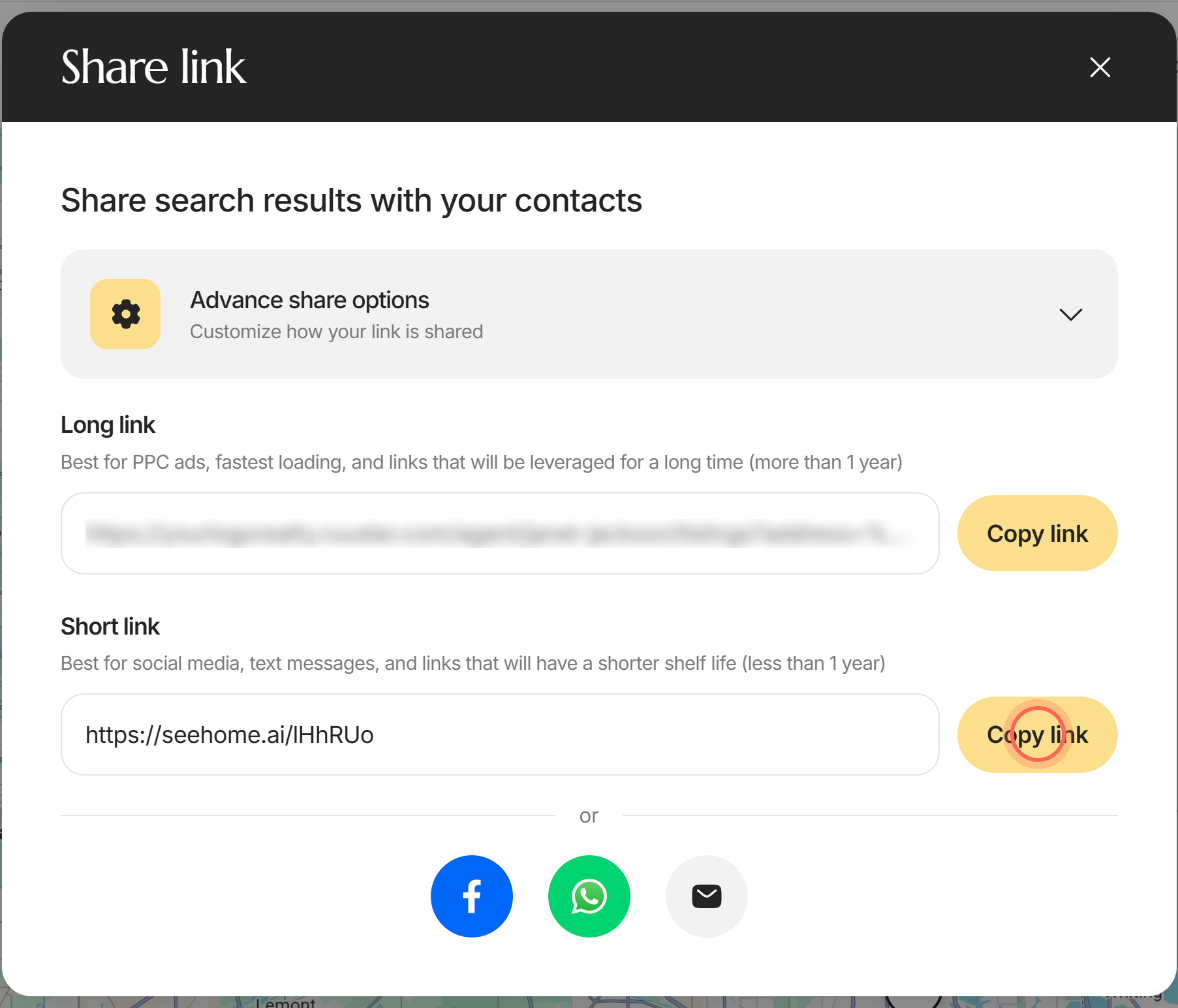
- Click Copy link next to Long link or Short link.
- Paste the link into your ad, post, text or email.
The button reads Copied!, and the link opens the same search on your brokerage's site, credited to you.
| Link | Use it for |
|---|---|
| Long link | Pay-per-click ads and links you'll use for more than a year. It loads fastest. |
| Short link | Social media, text messages, and links you'll use for less than a year. |
Below the links, after or, the Facebook, WhatsApp and email buttons share the short link once it's ready. The share icon is greyed out when every place in your search is excluded.
Make visitors sign up before they see homes
- In the Share link window, click Advance share options.
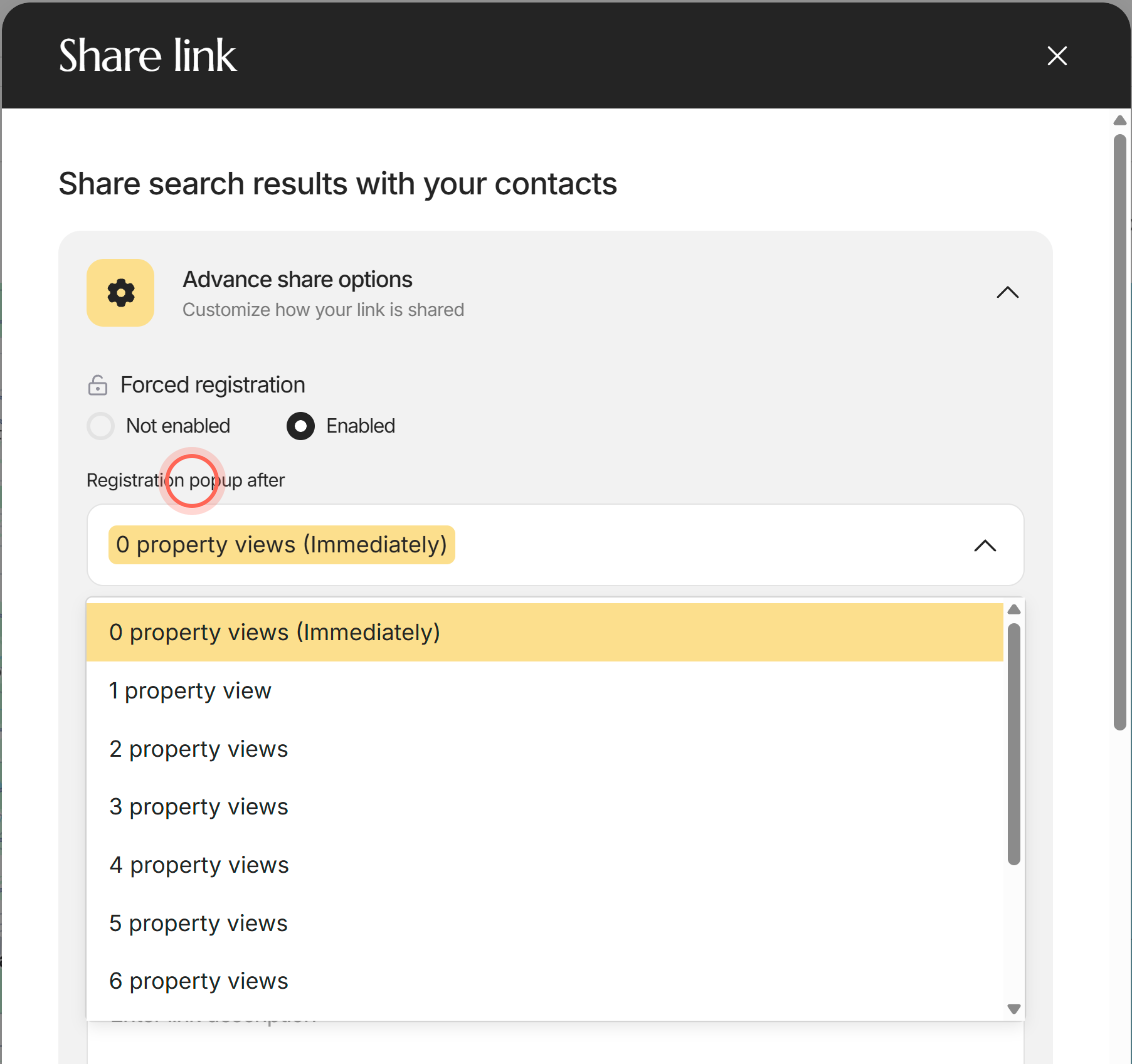
- Under Forced registration, click Enabled.
- In Registration popup after, pick 0 property views (Immediately) or a number up to 10 property views.
- Copy the link.
Visitors can browse the results freely. When they open a home, or once they've viewed the number of homes you picked, a "Free access" form appears.
The form asks for their name, email and phone number, and they can't close it until they sign up or click Sign In. Signed-in clients never see it.
Tag, track and route the leads
- In Advance share options, type a tag under Tags and press Enter or add a comma.
- Click UTM parameters (Advanced) and fill in the fields your campaign uses.
- If you're an admin, pick the agent who should get the leads in Register to leads to.
- Copy the link.
People who sign up through the link are tagged with your tags and go to the agent on the link. Visitors who send a question or a tour request from it without signing up get your tags too. Click Reset all parameters to start over.
What each advanced option does
| Control | What it does | Learn more |
|---|---|---|
| Forced registration | Not enabled (the default) lets anyone browse. Enabled adds the sign-up form. | |
| Registration popup after | Sets when the form appears, from 0 property views (Immediately) to 10 property views. Views are counted in each visitor's browser. | |
| Page title and Show number of properties before page title | Page title shows as the title at the top of the page the link opens. Show number of properties before page title puts the number of homes before that title. | |
| Link title and Link description | The text sent with the link in WhatsApp and email. Left blank, they read "Look at these properties I think you’ll be interested in." and "Check out these properties!" | |
| Link preview | Shows the first home's photo, the title, description and link. Apps that show link previews use the same photo and text. | |
| Register to leads to | Admins only. Sends sign-ups to the agent you pick, or Unassigned when your brokerage allows it. You're listed first. | Market a property with a share link |
| Tags | Tags everyone who signs up, asks a question or requests a tour through the link, so your CRM can route them. Press Enter or a comma after each tag. | |
| UTM parameters (Advanced) | Adds Campaign, Source, Medium, Term and Content codes for ad tracking. | |
| Reset all parameters | Shows once you change something, and puts every option back to its default. |
Good to know
- Short links count opens. When someone opens a short link, Ruuster counts the open and sends them to the full link. A short link that doesn't exist goes to a "not found" page.
- The short link follows your changes. It's created when the window opens and updates as you change options. Set your options, then copy.
- Hand-picked homes. To share only certain homes, tick their cards and click Share. See Share a property with clients.
- Clients can share searches too. Their links credit you, but they don't get Advance share options.
FAQ
Is there a link to a saved search I can copy and text to my client?
Set up the same places and filters on Home Search, click the share icon and copy the Short link. Then text it to your client.
Should I use the long link or the short link?
Use the long link for paid ads and links that stay up for over a year. Use the short link for social posts and texts.
Will people who already have an account need to register again?
No. The sign-up form only shows to visitors who aren't signed in.
Can I let people look around before asking them to register?
Yes. Set Registration popup after to the number of homes they can view first.
Where do the leads from my link go?
They sign up as your clients and show on All Clients with your tags. If an admin picked another agent, they go to that agent.
Still need help? Reach out to us at helpme@ruuster.com and we'd be happy to assist!