
See your clients' notes, ratings and photos
Using Ruuster 1.0? Read the 1.0 version of this article.
Clients rate, note and photograph homes in their app, and you see it in their activity. Notes, ratings and photos are client tools.
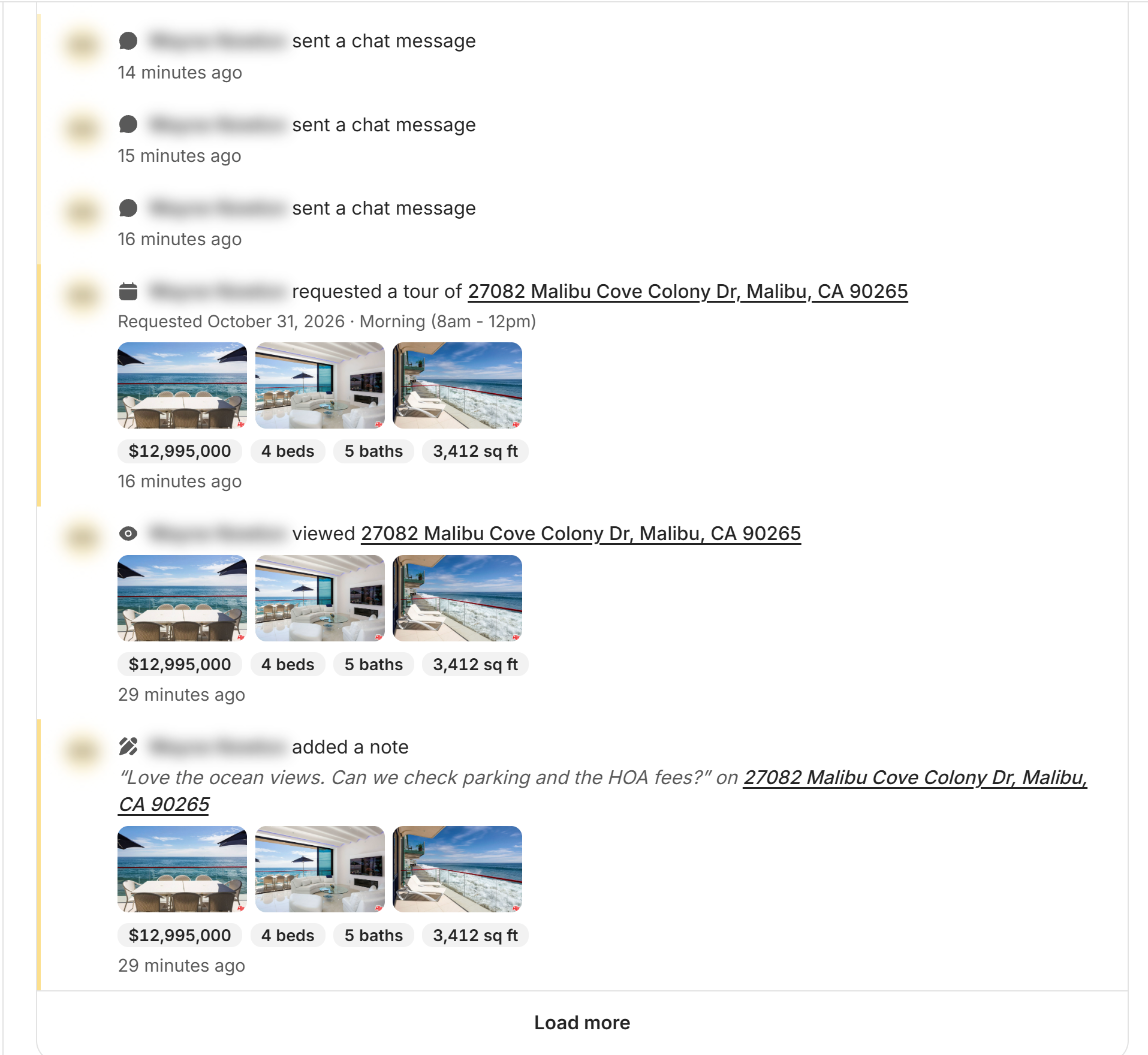
Notes, ratings and photos are your client's own feedback on homes, added on a home's page in their app. You read them under Activity on the client's page and in the Client Activity feed. Agents don't add their own.
How it works
On a home's page, signed-in clients see a Notes & feedback section with three tools.
| Your client adds | How they do it | Where you see it |
|---|---|---|
| A rating | Under Property Rating, they give 1 to 5 stars for Price, Size, Fixtures and Location. | The client's page: "rated" and the address, with the stars for each category. |
| A note | Under Notes, they type in Add note (optional) and click Save note. | The client's page and the Client Activity feed: "added a note", with the note quoted. |
| Photos | Under Photos, they click Add photos (SVG, PNG, JPG or GIF, up to 5MB each). | The client's page: "added photos of" and the address, with the photos. |
To read them, open the client from All Clients and scroll to Activity. Click Notes to see only notes. Ratings and photos sit under Other. Click a row's address to open the home.
When to use it
- Before you call. Read what they wrote about the homes they toured, so you know what they liked.
- To sharpen their search. Low Price or Location stars tell you what to change. See Add a search for a client.
- After a showing. Their photos remind you which home they mean.
- To spot interest. A note asking about a tour, an offer or availability is worth a fast reply.
Good to know
- Leads can't add feedback. Notes, ratings and photos need an account, so leads who haven't signed up have none.
- Clients can change their minds. They can edit a note, pick different stars or remove a photo from the home's page.
- Some listings have no photos. Clients can't add photos to listings from NWMLS.
- Favorites are separate. Homes your client saves show under Favorited Properties on their page. See Favorite properties.
FAQ
Can I add notes or ratings to a property as an agent?
No. Notes, ratings and photos are client tools, so homes you open don't show Notes & feedback. Keep your own notes about a client in your CRM.
Where do I find my client's note on a home?
On the client's page, scroll to Activity and click Notes. Notes also show in the Client Activity feed when you click Notes there.
How do I see which homes my client rated?
Open the client's page and scroll to Activity. Each rating row shows the address and the stars for Price, Size, Fixtures and Location.
Can I see the pictures my client took at a showing?
Yes. On the client's page, the Activity row for those photos shows them next to the home's address.
Still need help? Reach out to us at helpme@ruuster.com and we'd be happy to assist!