
Respond to tour requests and property questions
When a client requests a tour or asks about a home, you get an email and a chat message, and it shows in their activity.
When a client requests a tour, you get an email and a text. The request also appears in your chat with them as Tour requested, and in Client Activity. When someone sends the contact form on a home, you get a "Property Inquiry" email, and you answer by chat, phone or email.
What you get for each request
| Request | Email subject | Text to your phone | Also in Ruuster |
|---|---|---|---|
| Tour request | "{Client} has requested a tour of {address}" | "Tour Request:" with the date, time of day, the client's phone and email, and the listing ID | A Tour requested block in Chat for registered clients, and "requested a tour of" in Client Activity |
| Property inquiry from the contact form on a home, your landing page or your website search | "Ruuster | 💬 Property Inquiry from {name}" | None | "submitted an inquiry on" in Client Activity |
The email goes to the email address on your Ruuster account, and the text to its phone number. They go to the client's assigned agent.
Respond to a tour request
- Open the tour request email or text.
- Note the date and the time of day the client picked.
- In the sidebar, click Chat.
- Open the conversation with that client.
- Find the Tour requested block.
- Type your reply in Enter message.
- Press Enter to send it.
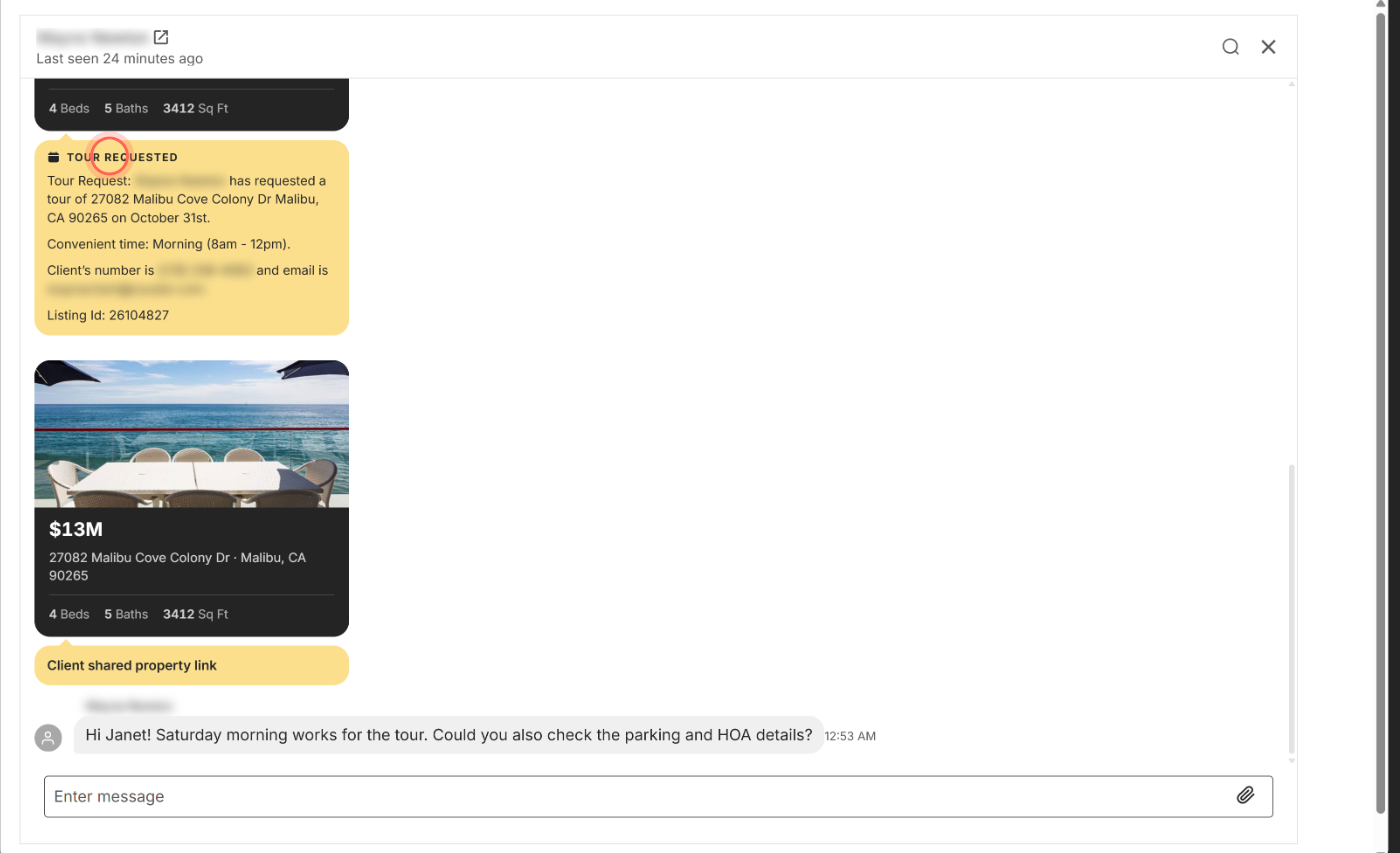
Your client sees the reply in their chat. Leads who haven't signed up have no chat, so call or email them with the details from the email.
Answer a property inquiry
- Open the email with "Property Inquiry from" in the subject.
- Read the client's name, email and phone at the top.
- Check the home's address, price, listing ID and the client's message.
- Click the property link to open the home.
- Contact the client by phone, email or chat.
The inquiry also shows in Client Activity under Other, so you can find it later.
Find requests later
- In the sidebar, click Clients, then Client Activity.
- Click Tours to show tour requests and offers.
- Click the client's name to open their page.
Good to know
- Replies go to Ruuster support. These emails come from notifications@ruuster.com, and replying sends your answer to support@ruuster.com, not the client. Contact the client directly.
- The stage moves forward. A tour request from a registered client moves their stage to Actively showing, unless they're further along.
- The home is saved for them. When a registered client requests a tour or sends a question about a home, it's added to their favorites. Requests from agent accounts aren't saved.
- Your client sees a reminder. Until the tour day, the home's page and its search card remind them of the day and time they picked. Asking again for the same home replaces it.
- Nothing is booked. Ruuster passes on the request. You confirm the time with the client.
FAQ
My client requested a tour but I never got notified. Where do I look?
Search your inbox and spam for "has requested a tour of" from notifications@ruuster.com. Then check that your email and phone number in Settings are current. Client Activity always shows the request.
Why didn't I get a text for a tour request?
Your brokerage may have text notifications turned off, or the phone number on your account is wrong. Update it in Settings.
Can a teammate get my tour requests too?
Not from Ruuster. The email and text go to the client's assigned agent only. You can forward the email yourself.
Why does the inquiry email say New Website Inquiry?
The person left their name blank on the contact form, so there's no name to put in the subject.
Do tour requests reach my CRM?
Yes, if your brokerage has a CRM connected. See Use Follow Up Boss with Ruuster.
Still need help? Reach out to us at helpme@ruuster.com and we'd be happy to assist!